


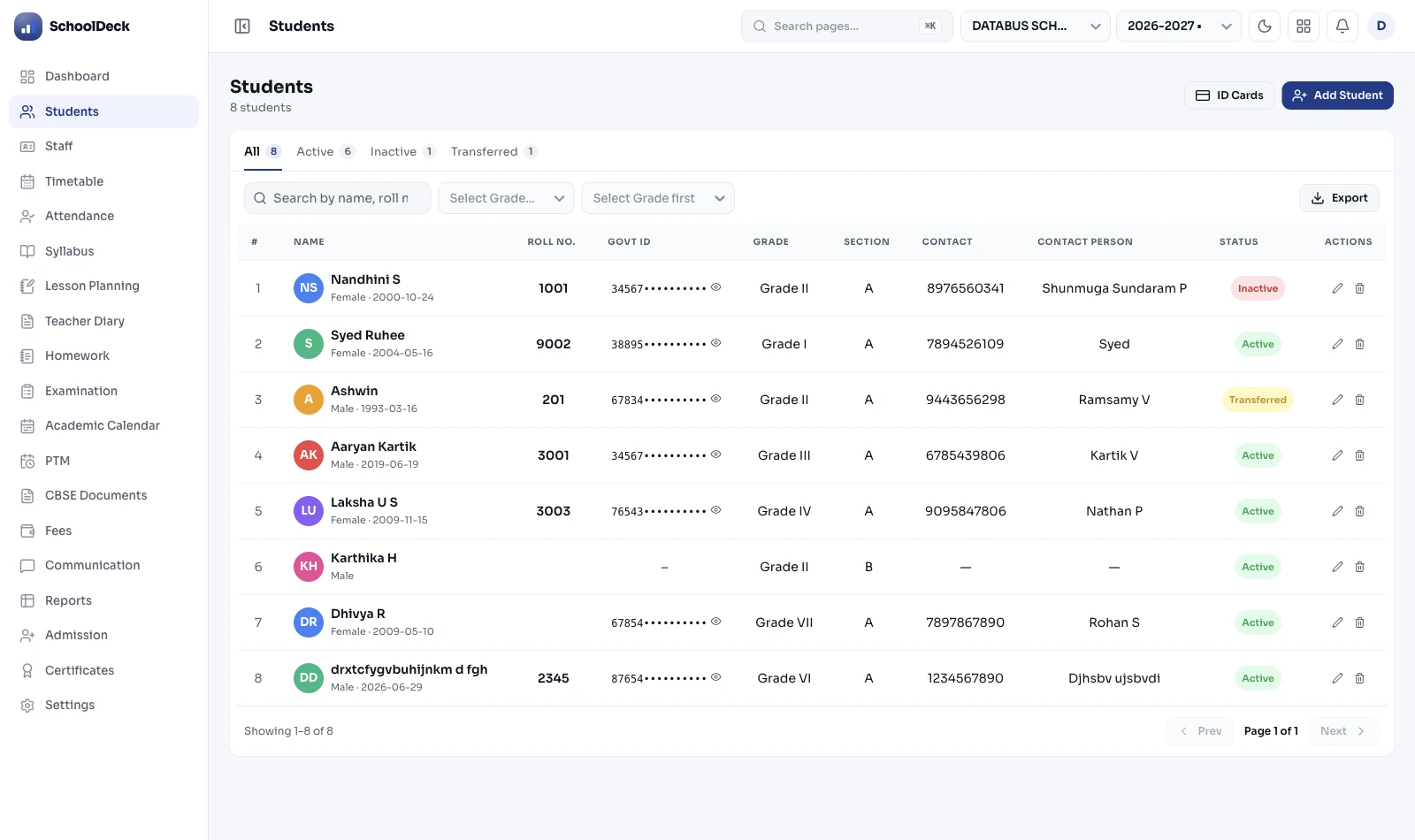
What is a Student Information System for Indian schools?
A Student Information System (SIS) is the canonical record of every enrolled student — the single source of truth that every other module reads from. SchoolDeck's SIS holds one 360-degree profile per student covering admission details, academic history, document vault, demographic category, medical essentials, Family ID linking siblings, and government identifiers. No other module writes to student-master fields; they all consume. Built specifically for CBSE, ICSE, ISC and all major State Boards in India.
The SchoolDeck SIS owns one specific layer: the canonical record itself. It does not own the enquiry-to-enrolment funnel (that's /features/online-admissions/, upstream). It does not own fee collection (that's /features/fees/, downstream consumer). It does not own alumni engagement (that's /solutions/alumni-management/, post-graduation outbound). It owns the record that all three read from.
Why "canonical" matters — the duplicate-record problem
Most Indian schools operate without a canonical student record. The admission file has one version of Anu Sharma. The fees Excel has another. Transport has a third. The WhatsApp parent group is a fourth. When Anu's mother changes phone number, the update reaches one or two of those four. The other two continue carrying stale data.
The consequences compound silently. The September fee SMS reminder bounces because transport has the old number. The board report card prints "Anuradha" because admission spelled it one way and exams another. UDISE+ export fails validation because DOB is mistyped in one place. The clerk reconstructs the truth from scratch every term — work that should not exist.
A canonical record fixes this structurally. One write surface. Every change captured in /features/audit-logs/ with who, when and what reason. Every read controlled through /features/role-based-access/. Every downstream module pulls fresh data each time. The SIS doesn't add features the school didn't have — it removes the data fragmentation problem the school never quite knew it had until it was gone.
Family ID — siblings linked at the record level
Indian school admissions across siblings span years. The elder child joined in 2019; the younger in 2022. By the time the third joins in 2024, the parent mobile may have changed, the class teachers are different, the admission clerks may not even be the same person. Without a structural mechanism to link them, the school treats each child as an independent record — and the family relationship lives only in someone's memory.
The Family ID mechanism solves this at the record level. When a new student is admitted:
- The system checks the parent mobile number against existing records.
- With parental consent, it also checks the Aadhaar match.
- If either matches an existing family, the same Family ID is assigned to the new student — linking them to their sibling(s).
- The parent's app login (created against the Family ID, not the individual student) now covers all enrolled children. One tap shows attendance, fees and report cards for every child.
- Downstream, /features/fees/ reads the Family ID and applies the school's sibling concession policy automatically. Three siblings means the third concession is applied; nothing is missed because nothing is manual.
The Family ID architecture matters during bulk import too — siblings in the import file are auto-detected by parent contact, linked under the same ID before the records commit. A school migrating 2,000 students with 380 sibling pairs has all 380 detected and linked in the first import run.
Document vault — permissioned, audit-logged, expiry-aware
Every Indian school holds a set of documents per student: Birth Certificate, Aadhaar (where parent has consented to storage), Caste Certificate with category and issuing authority, Income Certificate for RTE-25%-EWS eligibility, Previous School Transfer Certificate for the GR Book, Medical Fitness Certificate where the school's medical policy requires one, Disability Certificate where the student is registered as CWSN. In a paper-based system, these sit in a steel cupboard with the inherent risks of misplacement, water damage and unauthorised access.
The document vault attaches scanned copies to the canonical student record. The capabilities matter:
- Permissioned access — only staff with document-access role permission can open files. Transport coordinator cannot see medical documents; class teacher cannot see income certificate.
- Every open is logged — /features/audit-logs/ records who opened which document at what time. The DPDP Act 2023 audit trail is structural, not retrofitted.
- Expiry tracking — Income Certificate validity, Disability Certificate renewal date, Medical Fitness Certificate annual update. The system alerts the admission officer 60 days before expiry so the renewal happens before the certificate is needed.
- Sub-second retrieval — during a CBSE or State Board inspection, the inspector asks for one student's caste certificate. Two clicks, document on screen. No cupboard search.
- Field-level data extracted — Birth Certificate DOB verified against admission record. Caste Certificate number + issuing authority stored as data, not just an image, so they appear in inspection registers.
Demographic capture — CBSE registers, UDISE+, scholarship eligibility
Indian school student records carry three overlapping demographic responsibilities — board inspection compliance, UDISE+ annual data submission and scholarship eligibility determination. The same data drives all three, so capturing it once is the only sensible structure.
The SIS captures at admission:
- Social category: SC, ST, OBC (with Central List or State List specified), General. State-specific categories: VJNT, SBC, NT-A/B/C/D for Maharashtra; OBC-A/B for West Bengal.
- EWS status: Economically Weaker Section with income certificate number, issuing authority and annual renewal date — for RTE-25% admission tracking under RTE Act 2009 (as amended).
- Minority status: Religious minority (Muslim, Christian, Sikh, Buddhist, Jain, Parsi) + linguistic minority — required for government grant compliance in aided schools.
- CWSN status: Children With Special Needs with disability type, disability percentage and disability certificate number — required for UDISE+ CWSN reporting.
- Mother tongue: Language spoken at home — required for linguistic minority tracking in states with minority-language protections.
Category-wise registers are auto-generated from this data — filterable by class, section, gender and academic year, printable in the formats required for CBSE Affiliation Bye-Laws Ch. 9 inspection, ICSE inspection and State Board formats. The same data drives scholarship eligibility for MahaDBT (Maharashtra), MP Scholarship Portal and other state DBT systems where Aadhaar consent has been given.
Medical essentials — what staff need on a phone, in seconds, offline
Campus medical emergencies are rare but serious. A child with a severe peanut allergy reacting in the cafeteria. A child with epilepsy having a seizure in the science lab. A child collapsing during sports day. The staff member nearest the situation needs critical information on their phone in seconds — not after a trip to the admin office to search a physical file.
Each student's profile carries:
- Blood group: ABO + Rh factor — for emergency medical decisions.
- Allergies: Food (peanuts, dairy, shellfish, eggs), drug (penicillin, aspirin, sulfa), environmental — with severity level (mild, moderate, anaphylactic).
- Chronic conditions: Asthma (inhaler type), diabetes (insulin-dependent or not), epilepsy (seizure type), heart conditions, others.
- Current medications: Drugs taken regularly — relevant for drug-interaction awareness in emergency.
- Three emergency contacts: Father, mother, designated local guardian — all visible with one tap on the staff app.
The medical view works offline. Poor connectivity on a sports field or remote campus does not prevent access — the most recent profile is cached on the staff phone. The view is gated to staff with emergency-response role through /features/role-based-access/; non-emergency roles do not see medical data at all, per NCPCR 2021 guidelines on child-dignity record-keeping.
Legacy data migration — bulk import without manual re-entry
The most common reason Indian schools delay switching to a modern SIS is fear of migration. The Principal asks: "we have 2,000 students and 10 years of records — how does that move without months of manual entry?" The honest answer is structured bulk import.
The workflow:
- Structured templates: Excel/CSV templates provided during onboarding with every required column labelled and validated.
- Schools fill the template: Either by exporting from current software, or by structured copy-paste from existing registers. The SchoolDeck onboarding team helps map columns where the source software's export structure differs.
- Row-level validation before commit: The system checks every row before writing — missing required fields, duplicate records (same name + DOB + parent contact), invalid mobile lengths, malformed dates. Issues are surfaced for fix-before-commit, not discovered after import.
- Sibling auto-link: During import, the system detects siblings by matching parent contact / Aadhaar and applies the same Family ID.
- Historical data import: Prior years' report card data, fee payment history, attendance records — all importable into the new record so the SIS has a complete history from day one.
- Onboarding team support: Data cleaning, column mapping and the first import run are included in onboarding at no extra cost. Schools migrating 2,000+ students typically complete in 3-5 working days.
SIS ≠ Admissions ≠ Fees ≠ Alumni Engagement
The SchoolDeck student-lifecycle cluster has four primary pages. Each owns a distinct layer. Knowing the boundaries helps schools evaluate them correctly and prevents internal page competition for the same search intent.
- This page · /features/students/ — Owns the canonical student record itself. The 360° profile, document vault, Family ID, demographic capture, medical essentials. The single write surface; everything else reads.
- /features/online-admissions/ — Owns the enquiry-to-enrolment CRM. Capturing website leads, auto-WhatsApp follow-up, document collection during application, interview scheduling, merit list generation, source-ROI funnel. All BEFORE a student record exists.
- /features/fees/ — Owns fee collection. UPI collection (T+0), term-wise fee structure, sibling concession application from Family ID, Tally XML reconciliation, PDC tracking, parent reminders. Reads name and category from this module.
- /solutions/alumni-management/ — Owns alumni engagement after graduation or TC. Reunion organisation, 80G donation receipts, segment-targeted newsletters, alumni directory. The SIS owns the archived record; this owns the engagement layer on top of it.
Each page targets a distinct query intent. This page is for the Principal or admin head asking "what does our central student record actually look like?" Online Admissions is for the same person earlier — "how do I capture enquiries and convert them?" Fees is for the accounts head. Alumni Management is for the alumni relations officer. Four pages, four buyers, four search intents.
Fragmented registers + Excel vs SchoolDeck canonical SIS
Practical differences for a Principal of a 2,000-student CBSE+CIE composite school.
| Capability | Fragmented registers + Excel | SchoolDeck canonical SIS |
|---|---|---|
| Sources of truth per student | 4-6 (admission file, fee sheet, transport, parent app, etc.) | One canonical record |
| When mother's number changes | Updated in 1-2 of 4-6 sources | One update propagates to every module |
| Sibling concession | Manual identification — third child missed | Family ID + auto-application in fees |
| Inspector asks for caste certificate | Cupboard search, 20+ minutes | Permissioned vault, two clicks |
| CBSE Bye-Laws Ch. 9 registers | Compiled manually before each inspection | Auto-generated from canonical record |
| Medical emergency on sports field | Run to admin office, find paper file | Two taps on staff phone, offline |
| DPDP Act 2023 audit trail | No trail — paper register has none | Every read + write logged with timestamp |
| Duplicate-record detection | Found accidentally during fee reconciliation | Flagged at admission entry + bulk import |
| Duplicate TC for ex-student years later | Old register search — may be lost | Alumni archive — retrieved in seconds |
| UDISE+ annual data preparation | Weeks of manual compilation + validation | Export structure ready; school does portal upload |