This is the live single-school picture a Principal runs the school on — fee-collection rate, period-wise attendance, exam-result trends and syllabus pacing, current this morning — instead of waiting on a hand-compiled month-end report. Reporting on what's happened, not prediction.
For Principals, vice-principals & trustees · live rate/trend/pacing · single school · routes to prediction, forecast & cross-campus where needed.
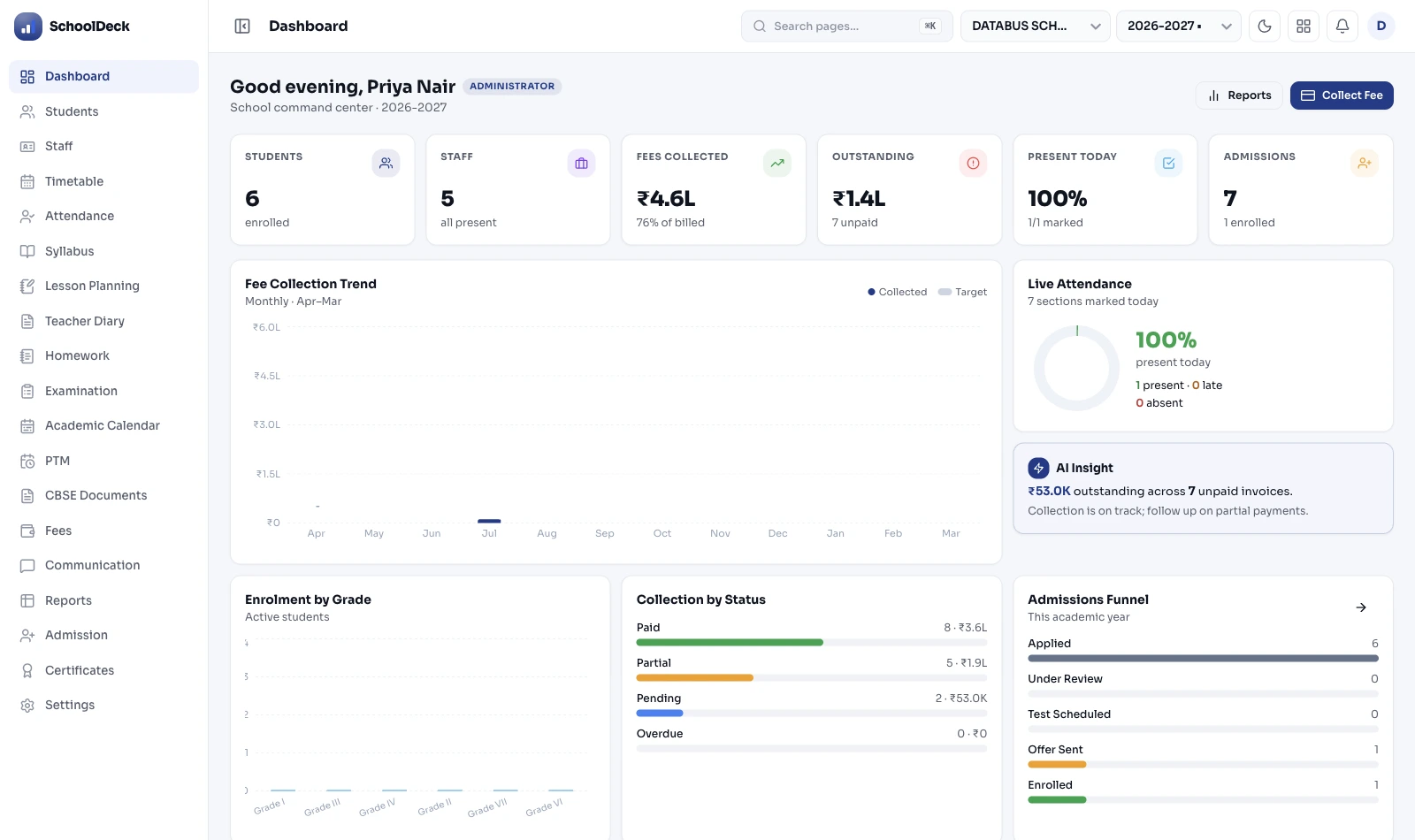
School analytics & reporting is the live single-school dashboard a Principal opens to see where the school stands right now — fee-collection rate against target, period-wise attendance, exam-result trends, and syllabus pacing across sections — instead of waiting for the office to compile a month-end report. It's reporting on what's already happened, drawn live from the fee, attendance, exam and lesson-planning modules. The forward-looking at-risk early warning on individual students is the student-performance-AI feature; the fee-default forecast is fee-prediction; the cross-campus comparison across several schools is the multi-branch use case; the change trail is audit-logs. This page reports; those predict, forecast, compare and record.
Mr Verghese opens the dashboard at 09:00 instead of asking the office for a report. Most of it is steady; the value is that the one metric drifting is visible now, and the dashboard hands him to the module that can act on it.
| Metric | What it reports | Reading | If it's off, go to |
|---|---|---|---|
| Fee-collection rate | % of term target collected | on track | forecast → fee-prediction |
| Attendance | period-wise & class-wise | steady | per-student → at-risk warning |
| Exam-result trend | across terms, by class | one class dipping | individual → student-performance-AI |
| Syllabus pacing | section vs expected | 2 sections behind | plans → lesson-planning |
The Principal asks the office for the figures, waits days for a formatted report, and by the time it lands the situation has moved. Decisions get made on last month's reality.
Fees in one place, attendance in another, marks in a third, syllabus in a teacher's diary — assembling one picture means opening everything and stitching it by hand, so nobody does it weekly.
A class's results slide, or two sections fall behind on syllabus, and it's only visible when the term's over — when there's no time left to do anything about it.
Staff spend days each month assembling routine reports by hand for the Principal and trustees — time that should go to running the school, spent formatting numbers that a live dashboard would just show.
Instead of asking the office to compile a report, the Principal opens a dashboard that's already current — drawing live from the fee, attendance, exam and lesson-planning modules of the same school. The numbers are as of this morning, not last month.
See what proportion of the term's fees is collected against target, and how that rate is moving, so a collection falling behind is visible while there's still term left to act — the action itself happening in the fees and reminders modules.
See period-wise and class-wise attendance and exam-result trends across terms — what's actually happened, as rates and trends, so the Principal knows which class or subject is moving the wrong way without reading every mark sheet.
See how far each section has progressed through the syllabus relative to where it should be. The pacing data comes from the lesson-planning module; this dashboard surfaces it alongside the rest.
When the dashboard shows something off, the Principal goes to the module that owns it — an individual student who may need intervention to the at-risk early-warning, a fee-default forecast to fee-prediction, the cross-campus comparison to the multi-branch use case. This dashboard reports; those pages predict, forecast and compare.
This dashboard reports rates, trends and pacing on activity that's already happened. It does not forecast or score the future — the forward-looking work is owned by separate, explainable features. Keeping that line clear is what makes the numbers trustworthy.
The dashboard shows your school's own figures against your own targets — it doesn't manufacture an industry "score" or a comparative percentile out of thin air. A real number against a real target beats a flattering invented one.
Every figure is drawn live from the module that owns it — fees, attendance, exams, lesson-planning — so the dashboard is a view, not a second copy of the data that can drift. Each number stays owned by its module; this page reads it. Data handled under DPDP Act 2023.
Framework references: DPDP Act 2023 (school data, role-governed access). This is operational reporting on completed activity, not prediction — the at-risk early-warning is owned by the student-performance-AI feature (an explainable model, reviewable by the academic head, never a black-box verdict), and the fee-default forecast by the fee-prediction feature. Figures shown here are illustrative of metric types, not performance claims.
SchoolDeck keeps the live operational dashboard distinct from the forward-looking prediction features and from the cross-campus group view on purpose — so this page ranks for the Principal's "where do we stand now" and never competes with the prediction or multi-campus pages.
The dashboard is the same; what each reader watches for shifts with the role.
A Principal opens the dashboard each morning to see fees, attendance, results and pacing at a glance, and catches the class slipping or the section behind while there's term left to act — then routes the specific case to the module that owns it.
A trustee of one school gets the same live picture for governance, instead of a monthly pack — with a view set by role-based access. For a trustee across several schools, the cross-campus view is the use case above this one.
A coordinator watches the result trends and syllabus pacing most closely, spotting the subject moving the wrong way — and takes an individual student to the at-risk warning when the live trend suggests a closer look.
"For most of my years as Principal, 'how is the school doing' meant sending a note to the office and waiting two or three days for a report that was already out of date by the time it reached me — fees from one register, attendance from another, marks from a third. What I wanted was simply to open one screen in the morning and see where we stand today. Now I do. Last month it showed me one class whose result trend had dipped and two sections that had fallen behind on the syllabus, and I could see it in the first week, not at the term-end review. I'll be precise about what it is, because I asked the team this directly: it shows me what has happened, it doesn't pretend to predict who will fail — when I want to look closely at a particular child, it sends me to the proper early-warning tool for that. And it's my school's numbers against my school's targets, not some invented score. That honesty is exactly why I trust the screen."
What every Principal, vice-principal and trustee asks before they swap month-end reports for a live dashboard.
We'll show you the live single-school dashboard — fee-collection rate, attendance, result trends and syllabus pacing — and how it routes you to the right module when something's off, in a demo on your school's actual data.
Book the Dashboard Demo →


