Automatic School Timetable Generator
A medium school with 40 teachers, 20 classes, and 8 periods a day has millions of possible schedule combinations. Most are invalid. The Constraint Satisfaction algorithm finds the few that work — automatically, conflict-free, in under 5 minutes.
No double-bookings. No missed lab slots. No Sunday-evening panics. Plus a daily substitution engine that does what you currently do by memory in the staff room at 7:50 AM — but faster, fairer, and without standing next to the door asking who's free.
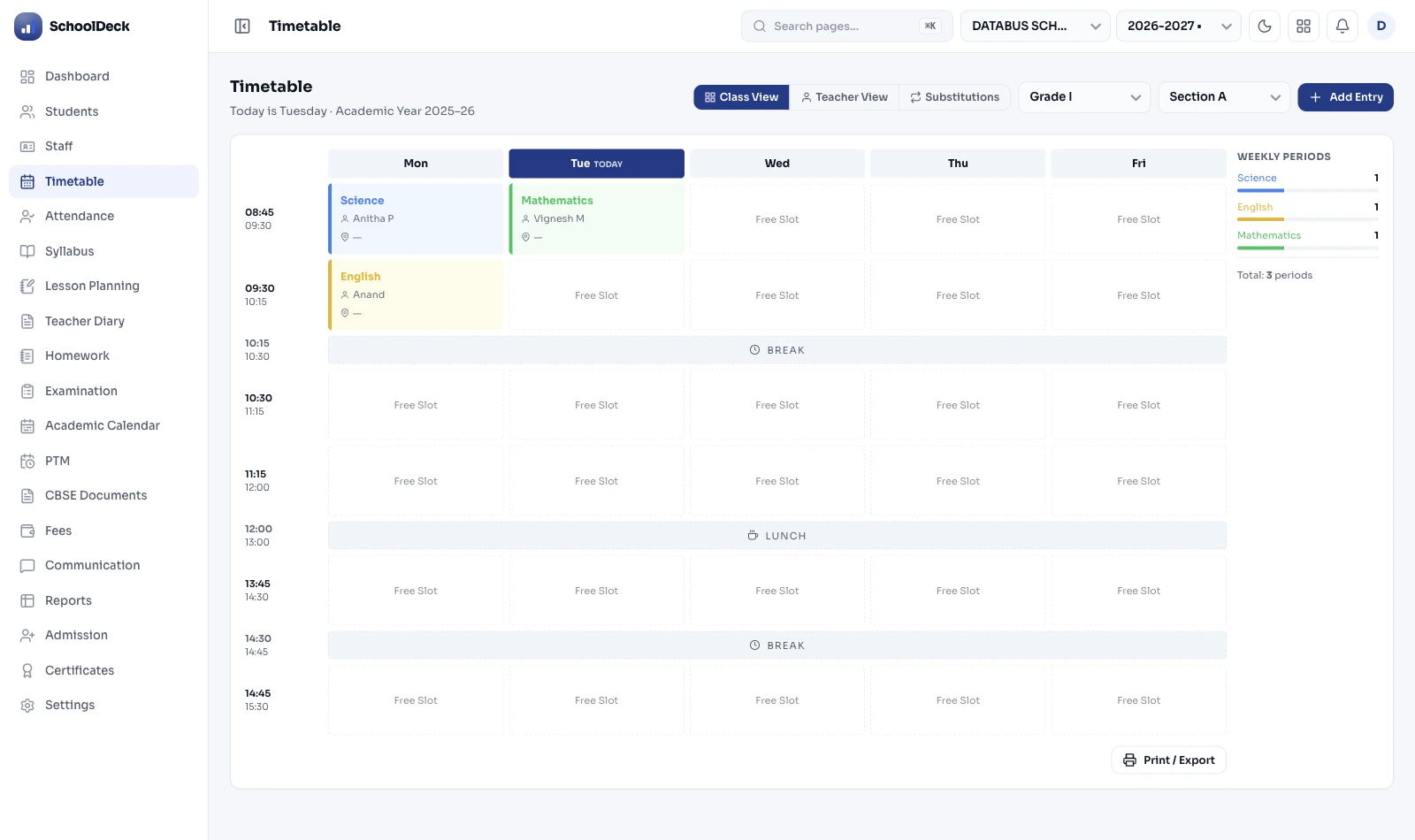
Timetable Generation
Most school coordinators build timetables the same way: a large grid on paper or Excel, shifting teachers around by hand until the clashes stop. The moment one thing changes — a part-time teacher joins, a lab gets booked for a week — the whole grid has to be redone.
SchoolDeck's Constraint Satisfaction algorithm takes your inputs — teachers, subjects, rooms, periods per week — and works out a valid, conflict-free arrangement automatically. You review and publish. That's the whole process.

Daily Substitutions
When a teacher calls in sick, the VP or coordinator currently has to cross-reference three things mentally: who is free that period, who teaches that subject, and who hasn't already been burdened with three covers this week. That's usually done by memory, under pressure, before first bell.
SchoolDeck does this automatically. The moment a teacher is marked absent in the staff attendance module, the substitution engine identifies every affected period and suggests the best available cover teacher for each one.

A medium-sized school with 40 teachers, 20 classes, and 8 periods a day has millions of possible schedule combinations. Most are invalid — a teacher double-booked, a lab over-allocated, a class left without a period of a compulsory subject. Finding the valid combinations by hand is not just tedious, it's a combinatorial problem that humans aren't built to solve reliably.
This is a well-known problem in computer science and operations research. School timetabling is formally classified as NP-hard — meaning no efficient algorithm exists to find the optimal solution as the problem grows larger. It's the same complexity class as airline crew scheduling and university examination timetabling. Manual approaches don't fail because coordinators aren't clever enough — they fail because the problem is too large for human working memory.
The typical Excel approach: start with a blank grid, place the hardest constraints first (the part-time Music teacher who comes in only on Tuesdays, the Computer Lab shared by four sections), and then fill in the rest. Every edit has cascading effects. Move one class and you need to check five other rows. Schools spend two to three weeks on this every academic year — and still end up with conflicts that surface only after the timetable is published.
The generator implements a Constraint Satisfaction Problem (CSP) solver with backtracking search and constraint propagation — the standard approach used in academic research on automated timetabling for the past four decades. It doesn't try all possible combinations (that would take days for a large school). Instead, it prioritises the hardest constraints first.
The algorithm starts by placing inflexible blocks into the schedule: part-time teachers with fixed availability, labs that can only handle one class at a time, subjects that require double periods for practicals. Once those are fixed, the remaining periods are filled around them. At each step, the algorithm checks for conflicts and backtracks if it hits one, trying a different placement. Constraint propagation prunes the search space — if placing a teacher in one slot makes another slot impossible, the algorithm detects this immediately rather than discovering it later.
When it's done, every slot is filled and every hard constraint is satisfied. Soft constraints are satisfied where possible and flagged where compromise was unavoidable.
What this looks like in practice: You enter your data on a Monday morning. By lunchtime, a valid timetable is ready for the VP to review. Any manual tweaks you want to make can be done by dragging periods — the system checks for conflicts in real time and flags any new ones instantly.
Not all scheduling rules carry equal weight. The platform separates them into two types, which is what allows the algorithm to find a solution even when perfect is impossible.
These are absolute. The algorithm will not generate a schedule that violates any of these:
These improve the quality of the timetable but can be relaxed if satisfying all hard constraints requires it:
CBSE and ICSE both specify maximum weekly teaching hours for faculty. Schools that exceed these limits — even unintentionally — create compliance issues during inspections. Manual tracking with Excel makes it easy to miss, especially when mid-year changes are made.
The platform includes a visual workload heatmap for every teacher with traffic-light status: green means under-utilised (room to add periods if needed), yellow means within norms, red means over the limit. Any teacher showing red flags the compliance issue before the timetable is published — not after the board inspection finds it.
The heatmap also helps spot departmental inequity — one teacher taking 32 periods a week while another takes 18 in the same department. Before automated heatmaps, this kind of imbalance often went unnoticed until a teacher complaint surfaced it.
In most schools, the bottleneck isn't teachers — it's rooms. The Chemistry Lab can only handle one batch at a time. The Computer Room has 30 machines for a school with six sections of 45 each. The Auditorium books up for assemblies, PT rehearsals, and parent meetings.
SchoolDeck treats rooms as resources with their own availability, capacity, and equipment type. The algorithm schedules room use alongside teacher and class placement — so the Computer Room is never double-booked, and Chemistry never lands in a room without a fume hood.
For practicals that need two consecutive periods — Biology dissections, Physics experiments, Chemistry titrations — the system automatically allocates double slots rather than scheduling them as two separate single periods that could end up non-consecutive.
A timetable can be perfectly conflict-free from an administrative point of view and still be a bad learning experience. A Class 12 student who has Physics, Mathematics, and Chemistry all in the same morning — followed by a PE session — will be cognitively depleted by Period 5.
Academic directors can configure subject distribution rules that spread demanding subjects across the week. No student gets three back-to-back "heavy" subjects in the same morning unless it's unavoidable. Lighter subjects — Art, Music, Physical Education — are used as cognitive breaks between intensive periods.
These aren't just pedagogical preferences. Schools that implement balanced schedules typically report better student attention in afternoon periods and fewer complaints from class teachers about student engagement.
The National Education Policy 2020 (released July 29, 2020) and the National Curriculum Framework for School Education 2023 (released August 2023) define a new structural shift for Indian schools — replacing the 10+2 model with a 5+3+3+4 stage structure. Each stage has different curriculum philosophies and consequently different timetable requirements.
SchoolDeck's engine supports separate timetable configurations per stage. Bagless Days (NEP's mandate of 10 per year) can be scheduled as special calendar dates with skill-based activity slots instead of academic periods. The Academic Management hub describes the broader NEP integration; this timetable engine is where it actually runs.
A standalone timetable app is useful. A timetable that's the backbone of your entire school ERP is transformative. In SchoolDeck, the master timetable isn't a separate document — it's a live data source that other modules read from automatically.
For a school with 30 teachers, 15 classes, and a standard 8-period day.
| Task | Pen & whiteboard | Excel | SchoolDeck |
|---|---|---|---|
| Time to build timetable | 2-3 weeks | 1-2 weeks | Under 5 minutes |
| Conflict detection | Manual — high error rate | Basic formula alerts | 100% automated, real-time |
| Teacher workload compliance | Tracked separately, often missed | Manual count per row | Visual heatmap, flags before publish |
| Daily substitutions | Morning panic, done by memory | Manual cross-reference | Automatic suggestion + mobile alert |
| Distributing timetable to staff | Printed and pinned to board | Email attachment | Live in mobile app, updates instantly |
| Mid-year changes | Rebuild from scratch | Manual re-check of all affected rows | Drag to change, auto conflict check |
| NEP 2020 5+3+3+4 stages | Not possible per stage | Manual per-stage spreadsheets | Native per-stage configuration |
Frequently asked questions
Once your data is entered — teachers, subjects, classes, rooms, and constraints — the CSP algorithm typically generates a complete, conflict-free timetable in under 5 minutes for a school with up to 60 teachers and 30 classes. The data entry itself takes 3-4 hours the first time (teacher profiles, subject competencies, room equipment types, weekly period requirements). After that initial setup, each new academic year takes about an hour to update — adjusting for new staff, retired teachers, and class structure changes.
The Conflict Analyzer pinpoints the exact bottleneck and tells you which constraint to relax. It won't fail silently with a generic error. Typical bottlenecks include: a teacher assigned more periods than the week has available slots, a lab over-subscribed by more sections than time periods, a part-time teacher's availability incompatible with their required workload, or subject minimum hours mathematically exceeding total slots. Schools often discover they've been overloading specific teachers without realising it — the Conflict Analyzer surfaces this before the timetable is published rather than during inspection.
When a teacher is marked absent in the staff attendance module, the substitution engine activates automatically. It identifies every affected period for that day, then for each period suggests available cover candidates ranked by three criteria: (1) subject match (Physics teacher prefers Physics cover, not PE), (2) current weekly substitution load (fair distribution — won't keep suggesting the same 3 people), (3) free during that exact period. The VP confirms each suggestion with one tap. The confirmed substitute receives an instant push notification with class name + room number + period + any notes — typically before they've finished their morning tea.
Five Academic Suite modules each own a distinct function — orchestrated by the Academic Management hub. (1) Auto Timetable (this page) — the master schedule + daily substitutions. (2) Lesson Planning — curriculum mapping, syllabus heatmap, NEP Learning Outcome tagging. (3) Homework Management — assignment dispatch + digital submission. (4) Library Management — barcode + OPAC + fine calculation. (5) Examination — CCE + FA/SA + AI Question Paper Generator. All five share one student database; the timetable feeds into the other four (lesson planner knows period count per subject; exam module knows exam-week overrides; virtual classroom links generate per period).
Yes. Save multiple versions — Winter Schedule, Summer Schedule, Exam Week, Sports Day Week, Half-Day Saturday. Switch between them with one click. Each version is fully independent, so activating the summer schedule doesn't overwrite the winter one. Useful for schools where summer means earlier start times, shorter period duration, or specific subject swaps (PE moved to morning when it's cooler, Art moved to afternoon). Switching versions republishes automatically to the staff and parent app.
Yes to both. Standard 5-day week, 6-day week with shorter Saturday periods, or alternating Week A / Week B (used by IB and Cambridge schools). Period duration varies by day correctly. For NEP 2020 schools, the engine supports separate configurations per stage — Foundational (ages 3-8) allows interdisciplinary blocks and play-based learning slots; Preparatory (8-11) allows themed half-days; Middle (11-14) and Secondary (14-18) use traditional subject-based periods. Bagless Days (NEP mandate of 10 per year) scheduled as special calendar dates with skill-based activity slots.
Yes. Teacher availability and preferences are soft constraints. If Mrs. Sharma has a long commute on Mondays and prefers not to be assigned Period 1, mark it as a preference — the CSP algorithm will try to honour it. If it's mathematically impossible while meeting all hard constraints (board minimum hours, no double-booking), the algorithm assigns Period 1 but flags the preference conflict for the VP to review. This is significantly better than Excel-based scheduling which has no concept of 'preference' — every constraint becomes hard, and the result is either unscheduable problems or undocumented compromises.
CBSE, ICSE, and most State Boards specify maximum weekly teaching hours per faculty. Schools exceeding these — even unintentionally — face compliance issues during board inspections. The platform includes a visual workload heatmap with traffic-light status per teacher: green (under-utilised), yellow (within norms), red (over the limit). Any teacher in red flags the compliance issue before publication, not after the inspection finds it. The heatmap also surfaces departmental inequity (one teacher at 32 periods/week while another takes 18) which usually went unnoticed in Excel-based scheduling.
Once the Principal approves and publishes the master timetable, it goes live in the SchoolDeck staff app and parent app immediately — no email distribution, no PDF printout, no pinning to staff room board. Teachers see their personal weekly schedule + today's classes + tomorrow's preview. Parents see their child's class schedule + period-wise subject + teacher name. Any subsequent changes (including temporary substitutions) update in the app in real time. Coloured PDF exports remain available for schools that want printouts — but most schools stop printing after the first month.
First-time deployment: 3-4 hours data entry, algorithm runs in under 5 min, review + manual tweaks 1-2 hours. Total — half a day to one working day from start to published timetable. Subsequent academic years: under an hour to update. Pricing: the timetable module is bundled within the standard SchoolDeck plan starting at ₹24,999 per year — no separate per-module charge. No setup fees for schools under 1,500 students. The module is part of the Academic Management Suite alongside Lesson Planning, Homework, Library, and Examination — all unified in one platform.
Connected modules in SchoolDeck
No double data entry. Once the timetable is published, every connected module reads from it as the single source of truth.
In the demo we'll enter your real class and teacher count and run the algorithm live — so you see how long it actually takes and what the output looks like before committing to anything.
From ₹24,999/year · 500+ Indian schools · Setup in one afternoon


