Databus Logo
Blog Login →
NCERT-compliant workload caps · NEP 2020 + NCF-SE 2023 ready · TRAI DLT compliant

Homework Management System for Indian Schools

It's 9 PM. Parent WhatsApps: "What's the homework today?" Diary is in a school bag in another house.

Daily assignment lifecycle for Indian schools. NCERT Homework Policy compliant — Class I-II no homework, Class III-V 2 hrs/week, Class VI-VIII 1 hr/day, Class IX-XII 2 hrs/day caps auto-enforced by the workload balancing calendar.

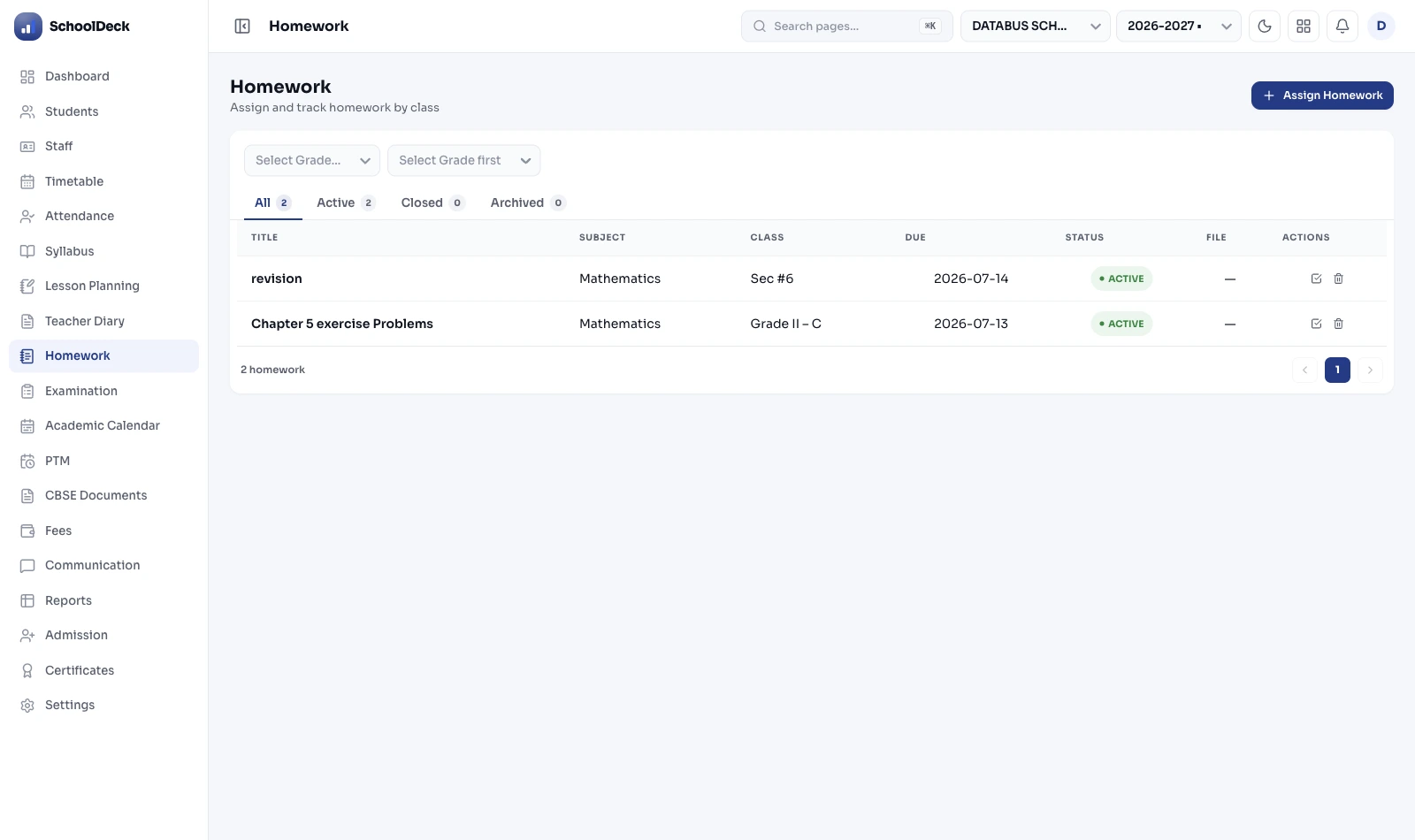
Assign → notify → submit → grade → return → archive. Replaces WhatsApp chaos with structured dashboard. Teacher mobile numbers masked. Parent gets visibility. Vice Principal sees compliance. Used by 500+ Indian schools.

I-II
No homework (NCERT)
2 hrs/wk
Class III-V cap
1 hr/day
Class VI-VIII cap
2 hrs/day
Class IX-XII cap

Four daily breakdowns of analog homework workflow

Why physical diaries and WhatsApp groups fail Indian schools.

📔

The 9 PM diary mystery

Child says "no homework today" because the diary is illegible, was copied wrong, or was simply not opened. Parent has no way to verify. By the time the school is contacted next morning, the assignment is already overdue and the cycle of stress + arguments has already happened.

📱

WhatsApp boundary collapse

Class teacher's personal mobile number is in 4 parent groups across 4 sections. Messages at 10:47 PM ("Sorry ma'am, Rahul says he didn't understand question 3"). No off-hours. Burnout in 6 months. The school has no policy lever to enforce because the WhatsApp groups are technically informal.

📚

Homework clustering

Math teacher assigns a 90-minute worksheet Wednesday. Science teacher independently assigns a project the same day. English teacher adds an essay. Total Wednesday workload: ~4 hours — well above NCERT's 1 hour/day cap for Class VIII. Students copy. Teachers don't know why submissions are weak.

🔍

Invisible teacher compliance

Vice Principal Academics can't see which teachers are actively assigning quality work versus the ones who've quietly stopped. The 12th-grade Physics teacher hasn't given homework in 11 days. Nobody notices until the parents start calling. By then, syllabus has slipped 3 weeks.

NCERT Homework Policy · NEP 2020 · NCF-SE 2023

The actual workload caps Indian schools must follow.

NCERT's homework policy (incorporated into NEP 2020 and the Ministry of Education's School Bag Policy 2020) sets explicit workload caps per stage. The Workload Balancing Calendar enforces these automatically — teachers cannot assign work that pushes a class over the cap.

Foundational

Class I-II

NO HOMEWORK per NEP 2020 and Ministry of Education School Bag Policy 2020. Foundational stage (ages 6-8) focuses on classroom learning + play. System blocks homework creation for these classes.

Preparatory

Class III-V

Max 2 hours/week total across all subjects. Mostly Offline Check assignments (e.g., 'Read Chapter 4 aloud') — no file upload required. System enforces weekly cap.

Middle

Class VI-VIII

Max 1 hour/day (~5-6 hrs/week). Workload Balancing Calendar shows existing day's load before publish. Teacher prompted to shift deadline if cap will be exceeded.

Secondary

Class IX-XII

Max 2 hours/day (~10-12 hrs/week). Same workload balancing logic — combined cross-subject visibility prevents Math + Science + English all assigning major work on the same day.

How the Workload Balancing Calendar enforces this

When a Class 8 Math teacher creates an assignment for tomorrow, the system checks: what's already scheduled for Class 8-A tomorrow across all subjects? If the answer is "Science worksheet (45 min) + English essay (30 min) + Hindi grammar (20 min) = 95 minutes already planned," and the new Math assignment is estimated at 30 minutes, the total would exceed the NCERT 1 hr/day cap by 35 minutes. The teacher sees this warning before publishing and can shift the Math deadline to Thursday or Friday where the load is lighter.

For the Vice Principal Academics, the weekly Workload Balance Report shows which classes are at-cap, which are under-utilized, and which subject combinations regularly cluster. Structural conversation, not reactive fire-fighting.

References: NCERT Homework Policy. Ministry of Education School Bag Policy 2020. NEP 2020 (Ministry of Education, Government of India, July 2020). NCF-SE 2023 (National Curriculum Framework for School Education, August 2023). State-level guidelines (Madhya Pradesh, Lakshadweep, Jammu & Kashmir notifications align with same caps).

"I am the Vice Principal Academics at a CBSE school in Noida — 1,650 students, 56 teachers, classes Pre-Primary through XII. Homework was where my role was failing. Every Wednesday morning at our coordinators' meeting, the same three issues came up: parents complaining that Math homework was always assigned on Monday evenings (when Hindi was already heavy), the senior Physics teacher who hadn't posted any work for two weeks, and the WhatsApp groups where my teachers were getting messages at 11 PM. I had no structural way to fix any of this. With SchoolDeck's Homework module, the Workload Balancing Calendar fixed the Monday clustering within the first week — Math teachers literally saw the warning before publishing and shifted to Tuesday or Thursday. The Teacher Compliance Report surfaced the Physics teacher problem in 4 days, not 4 weeks. We had a conversation. He was struggling with the Class 11 syllabus pace, not slacking — completely different intervention. And the teacher mobile numbers being masked means I have not had a single after-hours complaint from a teacher about parent WhatsApp messages in 7 months. Parents communicate through the app, teachers respond during school hours, the boundary holds. The NCERT caps being auto-enforced gave us our first compliant year ever — we used to violate the Class VIII workload cap routinely without realising. Now it just doesn't happen."
R
Mrs. Ritu Mehrotra
Vice Principal Academics · CBSE School, Noida · 1,650 students · 56 teachers · Migrated October 2024

The Academic cluster — four modules, four jobs

This page is part of the SchoolDeck Academic cluster. Four modules own distinct functions; this page does not duplicate them:

  • Lesson Planning — SYLLABUS COVERAGE: Digital Lesson Planner, topic-by-topic syllabus tracking, teacher diary digitization. Answers: "what topics has the teacher covered this week?"
  • AI Question Paper — CONTENT GENERATION: AI-generated worksheets and exam papers from a centralized question bank with board pattern templates (CBSE, ICSE, State Board, JEE, NEET). Answers: "generate a Class 8 Maths worksheet on Algebra."
  • Examinations — FORMAL ASSESSMENT: Exam scheduling, hall ticket generation, marks entry, board-specific grading (CBSE 9-point scale, ICSE percentage, State Board). Answers: "run the Term 1 examinations."
  • Homework Management (this page) — DAILY LIFECYCLE: Assign → notify → submit → grade → return → archive. Answers: "how do we handle daily homework end-to-end?"

Lesson plans drive what topics homework covers. AI Question Bank generates the worksheet content. Homework Management handles the daily lifecycle. Examinations handle formal assessments. Each module references the others through native integration but doesn't duplicate their work.

Daily assignment lifecycle — six stages

The Homework Management module handles the complete daily assignment lifecycle in six stages:

  1. Assign: Teacher creates assignment from lesson-planner topic, AI question bank query, or scratch. Multimedia attachments supported. NCERT cap auto-enforced.
  2. Notify: Published assignment instantly appears in every student's app and parent's app. Parent app shows the brief, attachments, deadline.
  3. Submit: Student completes work (typically in physical notebook for Math/Science showing-working-out), photographs the notebook page in the app, uploads against the specific assignment. Other formats — PDF, Word, MP3, MP4 — also supported.
  4. Grade: Teacher opens evaluation dashboard showing all submissions, assigns grade (numeric/letter/qualitative), optionally adds comment.
  5. Return: Graded assignment pushes back to student app within seconds. Faster feedback than physical notebook return.
  6. Archive: Permanent digital record. Searchable by class, subject, date, student. Used for academic audit and for term-end Report Card narration.

Why WhatsApp groups fail for homework workflow

Many Indian schools defaulted to WhatsApp groups during the 2020-2021 pandemic. The arrangement created predictable problems that persist today:

  • No structured submission tracking: Teachers scroll through hundreds of chat messages to find a student's submission photo. No record of what was submitted when.
  • Teacher mobile number exposure: Once a teacher joins a class parent WhatsApp group, every parent has their personal mobile number. Messages arrive at 11 PM with questions and complaints. Professional boundary destroyed.
  • No deadline enforcement or workload visibility: Each subject teacher operates in their own group with no view of the total student load. Math, Science, and English all assign heavy work on the same day, not knowing the others have.
  • No grading workflow: Work submitted, viewed, no record of feedback. Parent has no way to see what grade their child received.
  • TRAI DLT compliance gap: School-mass-message use of WhatsApp falls outside the consent and template architecture mandated under TRAI Telecom Commercial Communications Customer Preference Regulations 2018 for institutional communication.

SchoolDeck's Homework Management replaces WhatsApp groups for academic communication. Teacher mobile number masking — parents see school identity, never personal number. Structured submission tracking per assignment with permanent record. Integrated grading with parent-visible feedback. Deadline enforcement. NCERT-compliant workload visibility. For broader school messaging, the Communication Tool module handles WhatsApp Business API with TRAI DLT-compliant templates.

Multimedia assignments & the AI Question Bank shortcut

Modern pedagogy requires more than "Complete page 42." Teachers create rich assignments using multimedia attachments:

  • PDF worksheets: Scanned reference material, generated worksheets, instructional pages.
  • MP4 explainer videos: Up to 100 MB per file. Useful when the in-class explanation needed extra reinforcement.
  • MP3 audio notes: Recitation references, pronunciation guides for language subjects, dictation source recordings.
  • Image attachments: Board notes, diagrams, hand-drawn explanations.

The AI Question Bank shortcut: Rather than typing or scanning every worksheet, teachers can query AI Question Paper with the topic — "Class 8 Maths Algebra Linear Equations" — and receive a generated worksheet that becomes the homework attachment. Mapped to CBSE / ICSE / State Board patterns. Significant time savings for teachers who would otherwise spend hours preparing worksheets manually.

Differentiated learning: The teacher can send the standard assignment to the full class, an Advanced extension version to class toppers, and a Remedial practice sheet to students who scored below threshold on the most recent assessment. Differentiation invisible to students — each sees only their version.

Digital submission workflow & grading

Assigning homework digitally is useful. Collecting it digitally is transformative. Carrying stacks of 40 heavy notebooks back to the staff room is a physical burden teachers despise.

Submission workflow:

  • Student opens the SchoolDeck Student App, sees today's homework list with deadlines.
  • For each assignment: views the brief and attached materials.
  • For subjects requiring showing-working-out (Math, Science, Physics derivations) — student solves the problem in their physical notebook, snaps a photo of the notebook page using the app camera, uploads against the specific assignment.
  • For typed assignments — uploads PDF, Word, or Excel file.
  • For language subjects requiring recitation — uploads MP3 audio file.
  • For presentation or experiment-recording subjects — uploads MP4 video.

Grading workflow: Teacher opens the evaluation dashboard, sees all submissions for the assignment organized by student name. For each submission: views uploaded photo or file, assigns grade (8/10 or A/B/C/D or qualitative descriptor like "Excellent grasp"), optionally adds inline comment, clicks Return. Graded assignment pushes back to student app within seconds.

Daily grades aggregate into term-end performance data feeding the Report Card narration for NEP 2020 Holistic Progress Card generation. Major assessment-linked homework (projects, term assignments) connects to Examinations for inclusion in formal Continuous Assessment grade.

The Workload Balancing Calendar — preventing Homework Clustering

The most common workload violation in Indian schools is teacher independence. The Math, Science, and English teachers each independently assign a major task on the same day. The result is what teachers call Homework Clustering — days when students are crushed under impossible workload, leading to stress, copying, and assignment skipping.

How the Workload Balancing Calendar works:

  • When a teacher creates an assignment for Class 8-A due Wednesday, the system displays the existing homework load already scheduled for that class on that date and for the week.
  • Each existing assignment includes its estimated time. New Math worksheet: estimated 30 min. Existing Science worksheet: 45 min. Existing English essay: 30 min. Existing Hindi grammar: 20 min. Total: 125 minutes for Wednesday.
  • NCERT cap for Class VIII is 1 hour/day. New total of 125 minutes exceeds cap by 65 minutes.
  • Teacher sees warning before publishing: "Class 8-A is at 125 minutes for Wednesday. NCERT cap is 60 minutes. Shift this Math assignment to Thursday (currently 40 minutes scheduled) or Friday (15 minutes)?"
  • Teacher shifts deadline. Wednesday remains at 95 minutes. Thursday becomes 70 minutes. Both within sensible range.

For the Vice Principal Academics, a weekly Workload Balance Report aggregates this across all classes — identifying which classes are systematically at-cap, which are under-utilized, and which subject combinations regularly cluster. This enables structural conversations at the coordinators' meeting rather than reactive fire-fighting after a parent complaint.

Teacher Compliance Report for Vice Principals Academics

Vice Principals Academics and Academic Coordinators cannot physically sit in every classroom every day. The Teacher Compliance Report aggregates assignment data into actionable signals:

  • Assignment frequency per teacher: Flagged if a teacher hasn't posted homework for 3+ school days against their configured frequency (e.g., "Math teachers post 3x/week"). Surfaces the senior teacher who has quietly stopped without anyone noticing.
  • Submission rates per teacher: Flagged if a teacher's submission rate is significantly below the school average. 40% submission when class average is 80% signals either unclear instructions, disengaged students, or both — different interventions for each.
  • Workload distribution per class: Flagged if any class section is at or above NCERT cap for the week. Identifies systemic patterns (e.g., Class 10-B always at cap on Mondays).
  • Grading turnaround time: Flagged if assignments are submitted but not graded for 7+ days. Surfaces teachers who are assigning but not engaging with student work.

The Vice Principal uses this for weekly Section Head conversations, not punitive monitoring. Signal of which teachers need help with what. The Physics teacher who hasn't posted for 11 days may be struggling with syllabus pace — completely different intervention from slacking.

Parent accountability loop — without the WhatsApp chaos

Parental involvement is one of the strongest predictors of student academic success. The SchoolDeck Parent App turns the parent into an active stakeholder by providing structured visibility — not unstructured WhatsApp noise.

What the parent sees:

  • Unified calendar view of all upcoming assignments across all subjects for their child.
  • Per-assignment: brief, attached materials, deadline, submission status (pending / submitted / graded).
  • Grade received with any teacher comment, immediately after grading.
  • Notification when assignment published (immediate or end-of-day digest — parent's choice).
  • Notification when deadline is approaching (24 hours before — configurable).
  • Notification when deadline is missed without submission.

All communication routed through the app, not through teacher personal mobile numbers. Parent sees school identity, never personal WhatsApp number. Teacher off-hours protected. Boundary holds.

Physical diary + WhatsApp vs SchoolDeck Homework Management

Capability Physical diary + WhatsApp SchoolDeck Homework Management
Parent visibility Depends on child opening diary App push notification, immediate
NCERT workload caps Routinely violated, invisible Auto-enforced per class stage
Teacher mobile privacy Personal number exposed to all parents School identity masked, no personal number
Submission tracking No record of who submitted what Per-assignment per-student status
Workload clustering prevention Each teacher independent, no visibility Cross-subject calendar with warnings
Teacher compliance signal Discovered weeks later via complaints VP dashboard, 3-day flag threshold
Grading workflow Days to return physical notebooks Seconds — graded assignment pushes back
Multimedia support Photo in chat, lost in scroll PDF / MP4 / MP3 / image, organized
Permanent archive Notebooks lost, WhatsApp wiped Permanent digital record, searchable

Frequently asked questions

What Vice Principals Academics ask before switching.

How does the system handle NCERT and NEP 2020 homework policy compliance?

+

NCERT Homework Policy (incorporated into NEP 2020 and Ministry of Education School Bag Policy 2020) sets explicit per-stage workload caps. Class I-II: NO homework (Foundational stage). Class III-V: max 2 hours/week. Class VI-VIII: max 1 hour/day (~5-6 hrs/week). Class IX-XII: max 2 hours/day (~10-12 hrs/week). The Workload Balancing Calendar enforces these caps automatically — when a teacher creates an assignment for Class 8-A, the system shows current week's load already scheduled across all subjects. If adding would push the class over the NCERT cap, teacher receives warning before publishing. Eliminates the most common workload violation: independent subject teachers each assigning heavy work without knowing what the other teachers have already assigned.

How does Homework Management differ from Lesson Planning, AI Question Paper, and Examinations?

+

Four distinct modules in the SchoolDeck Academic cluster. (1) Lesson Planning owns syllabus mapping + topic coverage. (2) AI Question Paper owns question generation + paper templates. (3) Examinations owns formal exam scheduling + marks + grading. (4) Homework Management (this page) owns DAILY ASSIGNMENT LIFECYCLE — assign + notify + submit + grade + return + archive. Clean separation: lesson plans drive topics, AI Question Bank generates worksheets, Homework Management runs daily lifecycle, Examinations handle formal assessments. Each module references the others through native integration but doesn't duplicate work.

Why is WhatsApp a poor platform for assigning homework?

+

Predictable problems persist from pandemic-era WhatsApp habits. No structured submission tracking — teachers scroll through hundreds of chat messages to find a student's photo. Teacher mobile number exposure — every parent has personal mobile number; 11 PM messages destroy professional boundaries. No deadline enforcement or workload visibility — each subject teacher operates independently, Math+Science+English all assign heavy work same day. No grading workflow — no record of feedback. TRAI DLT compliance gap — school-mass-message use falls outside the consent and template architecture mandated for institutional communication. SchoolDeck replaces WhatsApp groups for academic communication with: teacher number masking, structured submission tracking, integrated grading, deadline enforcement, NCERT-compliant workload visibility.

How does digital submission work for younger students (Classes I-V)?

+

Class I-II (Foundational stage): NO homework assigned per NCERT and NEP 2020. The system enforces this — teachers cannot create homework assignments for these classes; they can create classroom-only learning activities tracked separately. Class III-V (Preparatory stage): homework capped at 2 hours/week total across all subjects. Teachers mark assignments as 'Offline Check' — e.g., "Read Chapter 4 aloud to parent" or "Practice times tables 5-9". System tracks deadline and notifies parents that assignment exists, but no digital file upload required from the child. Respects both NCERT workload cap and developmental reality that 8-10 year olds shouldn't be spending hours uploading photos. Parent simply acknowledges in app that offline task was completed.

What does the Workload Balancing Calendar do?

+

Prevents Homework Clustering — days when students are crushed under impossible workload because Math, Science, and English teachers each independently assigned major work the same day. When teacher creates assignment for Class 8-A, system displays existing load already scheduled for that class on that date and the week. If class already has 3 major assignments due, system displays warning prompting teacher to shift deadline. If total weekly load approaches NCERT cap, warning escalates. Vice Principal Academics sees weekly Workload Balance Report showing which classes are at-cap, which are under-utilized, which subject combinations regularly cluster — enabling structural conversations rather than reactive fire-fighting.

How does the Teacher Compliance Report for Vice Principals work?

+

Aggregates assignment data into actionable signals. Assignment frequency per teacher — flagged if hasn't posted for 3+ school days against configured frequency. Submission rates per teacher — flagged if significantly below school average (40% vs class average 80% signals unclear instructions or disengaged students). Workload distribution per class — flagged if any class at or above NCERT cap for week. Grading turnaround time — flagged if assignments submitted but not graded for 7+ days. Vice Principal uses for weekly Section Head conversations, not punitive monitoring — signal of which teachers need help with what. The Physics teacher who hasn't posted for 11 days may be struggling with syllabus pace — completely different intervention from slacking.

Can teachers schedule homework in advance?

+

Yes — Schedule-and-Forget weekly drafting is heavily used. Teachers draft entire week's homework on Sunday evening, set specific Publish Dates and Times (e.g., "Monday 3:00 PM after Class 8-A Math period"), system auto-publishes at scheduled time. Allows teachers to do lesson preparation in concentrated blocks rather than fitting it between teaching hours. Drafts editable until publish time. After publish, edits tracked in audit log.

What multimedia file formats are supported?

+

Teacher assignments support: PDF (worksheets, scanned reference), JPG/PNG (board notes, diagrams), MP4 (explainer videos up to 100 MB), MP3 (audio notes, pronunciation guides), Word documents, Excel sheets. Student submissions support: JPG/PNG (photo of handwritten notebook — most common for Math/Science/Hindi composition), PDF (typed assignments), Word/Excel, MP3 (recitation for English, Sanskrit, language subjects), MP4 (presentation videos, science experiment recordings). Maximum file size 100 MB per attachment. Mobile app camera defaults to compressed JPG to keep upload fast on rural 4G connections.

How does this integrate with Lesson Planning and AI Question Paper modules?

+

Native cluster integration. (1) When teacher completes a topic in Lesson Planning Digital Lesson Planner ("Class 8 Maths · Algebra · Linear Equations · taught March 12"), planner prompts to assign related homework with one click. Topic context flows automatically — no duplicate entry. (2) When teacher chooses to assign worksheet rather than text-only homework, the AI Question Bank query interface opens with topic pre-filled — "Class 8, Maths, Linear Equations" returns generated worksheet that becomes homework attachment. (3) Daily grades from homework feed into Report Card narration for NEP 2020 Holistic Progress Card term-end narrative generation. (4) Major assessment-linked homework connects to Examinations for formal Continuous Assessment grade.

What does deployment and pricing look like?

+

Deployment: bundled within standard SchoolDeck rollout (7-10 working days for single school). Module-specific steps: configure NCERT workload caps per class stage (defaults populated, school can customize lower but not higher than NCERT caps); configure per-subject assignment frequency expectations for Teacher Compliance Report; configure parent notification preferences (immediate, end-of-day digest, or both); train teachers on assignment creation workflow (90-min session, recorded for absent teachers); pilot with two class sections for one week before whole-school rollout. Pricing: bundled within standard SchoolDeck plan at ₹30 per student per month. No separate per-module charge, no per-assignment charge, unlimited multimedia storage included up to standard fair-use thresholds.

Academic cluster

Four modules. Four jobs. Native integration.

For Indian Vice Principals Academics & Academic Coordinators

End the 9 PM diary mystery. Protect teacher off-hours. Stay NCERT-compliant.

Daily assignment lifecycle. NCERT & NEP 2020 workload caps auto-enforced. Workload Balancing Calendar. Teacher Compliance Report. WhatsApp number masking. Permanent digital archive.

From ₹30/student/month · 500+ Indian schools · Live in 7-10 days