One platform for the whole exam cycle — scheduling, hall tickets, encrypted question-paper delivery, on-screen marking, and SGPA/CGPA results. Built around how the Controller of Examinations office actually works, so nothing gets re-typed between steps.
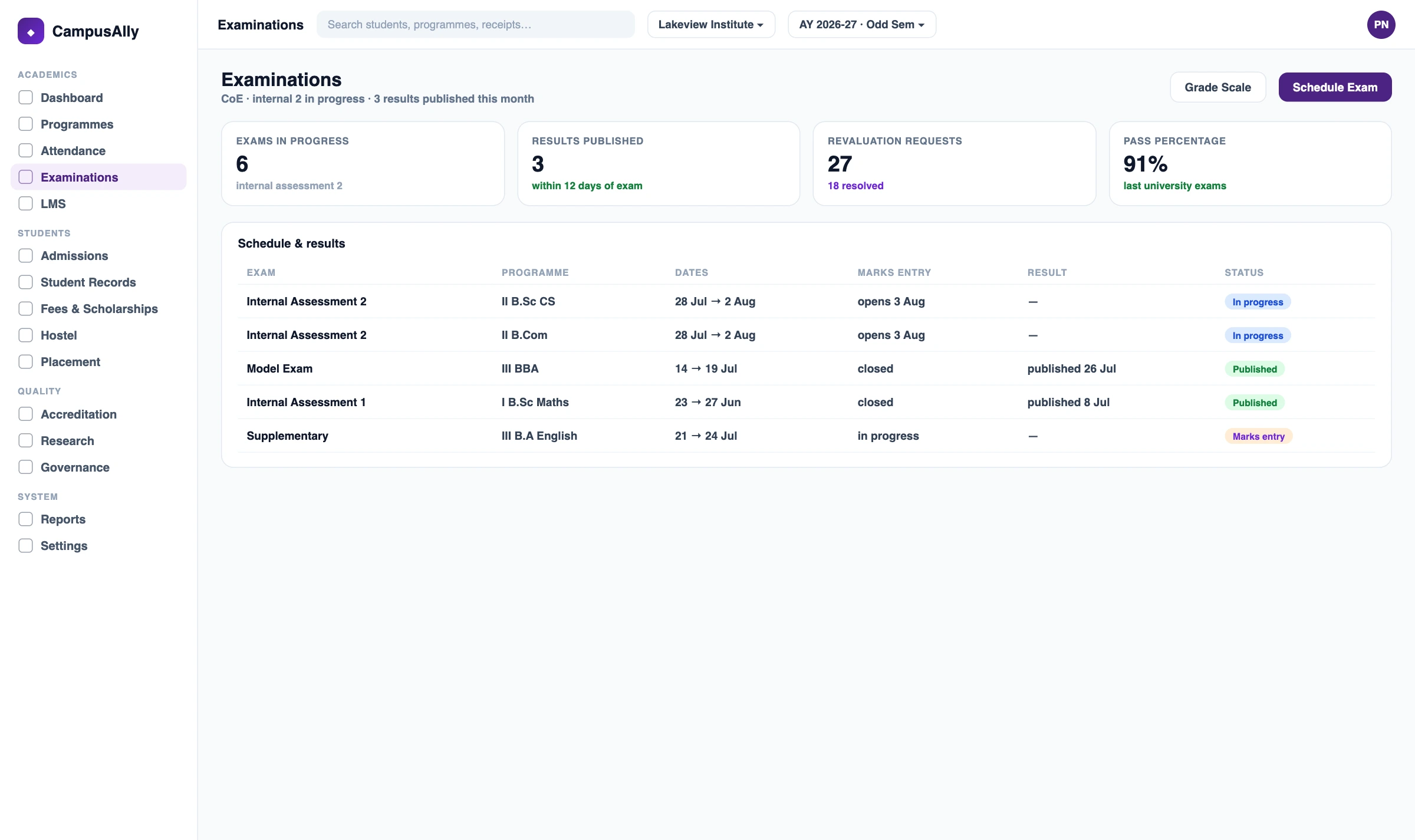
A college examination management system (EMS) runs the full exam lifecycle for a college or university — scheduling, hall tickets, secure question-paper delivery, on-screen evaluation, SGPA/CGPA results, publishing, and revaluation. It's built for the Controller of Examinations (CoE) office and replaces manual spreadsheets and courier-based paper distribution.
CampusAlly's EMS owns the exam lifecycle and connects to the rest of your campus: it reads attendance and fee eligibility from the Attendance and Finance modules, and feeds results and Course-Outcome data to the Academics and Accreditation modules. One source of truth, no double entry.
Whether you run one autonomous college or coordinate exams across 100+ affiliated institutes, CampusAlly fits your structure.
Set your own grading logic, result cycles, grade-card designs, and supplementary schedules — independent of your affiliating university.
Deliver encrypted question papers to 100+ centres, track valuation progress, and publish results from one dashboard.
Role-based dashboards give CoE staff, paper-setters, evaluators, and invigilators exactly what they need — and nothing they don't.
Run multi-department semester exams, arrear papers, and back-paper scheduling — with results feeding straight into your accreditation evidence.
Every step flows into the next automatically. No re-entering data between modules.
Plan the full schedule across departments, semesters, and centres — with automatic clash detection and room allocation.
Issue QR-verified hall tickets and block the ones that don't qualify — using eligibility decided by the modules that own it.
Designed to cut leak risk. Papers travel encrypted and unlock only at the right time and place.
Examiners mark scanned scripts digitally, from any location. No courier delays, no missing scripts, no totalling slips.
Turns marks into results for any standard Indian universities use — no custom coding per institution.
Publish to thousands of students at once — no server crashes, no WhatsApp forwards, no notice-board crowds.
The exam module owns the re-evaluation engine; students apply and pay through the portal and finance modules.
A tamper-evident system that protects you in disputes, RTI queries, and accreditation scrutiny.
Examination owns hall tickets, seating, marks and results. Eligibility, fees, Course-Outcome attainment, and NAAC reports are owned by other modules — the exam module reads from and feeds them, so data is never entered twice.
Owns the 75% UGC/AICTE eligibility engine. The exam module reads the result to allow or block a hall ticket.
Attendance Management →Owns fee collection. The exam module reads fee clearance for eligibility and sends revaluation fees here.
College Finance →Owns CO-PO attainment calculation. The exam module feeds it question-to-Course-Outcome tags.
Academics Management →Owns AQAR/SSR compilation. The exam module feeds it results and student-progression data.
NAAC Accreditation →CampusAlly is built specifically around the Controller of Examinations workflow — not bolted onto a generic ERP.
| The job | CampusAlly EMS | Manual / courier process |
|---|---|---|
| Question paper delivery | AES-256 encrypted QPD with time-locked SMS password | Email or physical courier — high leak risk |
| Answer-script evaluation | On-screen marking with anonymous barcodes | Scripts couriered to evaluators — slow, lossy |
| SGPA / CGPA results | Auto-computed from credit points (CBCS / NEP 2020) | Manual Excel formulas — error-prone |
| Result turnaround | Auto-calculated as soon as marks are in | Weeks of manual totalling and verification |
| Revaluation | Apply & pay in the Student Portal | Paper application → manual processing → long wait |
| NAAC evidence | Result data feeds the Accreditation module automatically | Hand-compiled from scattered spreadsheets |
A college examination management system (EMS) runs the full exam lifecycle for higher-education institutions — scheduling, hall ticket generation, secure question-paper delivery, on-screen evaluation, SGPA/CGPA result processing, publishing, and revaluation. It's built for the Controller of Examinations (CoE) office. CampusAlly's EMS owns the exam lifecycle and connects to other modules — reading attendance and fee eligibility, and feeding results to the academics and accreditation modules — so nothing is entered twice.
Yes. The result engine processes SGPA and CGPA for the Choice Based Credit System (CBCS) and NEP 2020 — handling core, elective and audit courses with different credit weightages, plus grace-marks moderation and score normalisation across paper sets. It also captures question-to-Course-Outcome tags during marking and feeds them to the Academics module, which owns the CO-PO attainment calculation used for accreditation.
Question papers are uploaded by the paper-setter and encrypted with AES-256 in the cloud. On exam day, centres download the encrypted file about an hour before the start, but it stays unreadable. A decryption password is sent by SMS to the Chief Superintendent only around 30 minutes before the exam begins. This is designed to reduce the leak risk that comes with email delivery or physical courier — still common at many Indian universities today.
On-Screen Marking (OSM) is digital evaluation — scanned scripts are marked on a computer instead of on paper. CampusAlly masks student identity with a barcode so evaluators can't see the name or roll number, replaces red-pen marking with digital tools (ticks, stamps, comments), and auto-totals question-wise marks to remove addition errors. Because examiners can work from any location, result processing is considerably faster than couriering physical scripts.
Yes. CampusAlly supports semester, annual, and hybrid patterns where different departments follow different formats. It also handles supplementary, arrear, and back-paper scheduling in the same platform, with the CoE keeping centralised control over every pattern at once.
The exam module produces the underlying evidence — pass rates, CGPA distributions, subject-wise trends, and question-to-Course-Outcome tags — and feeds it to the Accreditation module, which compiles the NAAC AQAR and SSR submissions (Criterion V, plus the OBE data behind Criterion III). The exam module is the source of the data; the accreditation module turns it into the formatted report.
Yes. Students apply for revaluation or re-checking through the Student Portal, pick the subject, pay the fee (collected by Finance), and track status. The Controller of Examinations assigns the script to a re-evaluator, and once approved the corrected result republishes automatically — with a full audit trail of both the original and revised marks.
They serve different institutions. SchoolDeck's exam module is for K-12 schools — CBSE/ICSE/State Board marks entry, FA/SA assessments, and report cards. CampusAlly's examination module is for the college and university Controller of Examinations workflow — high-stakes semester exams, encrypted question-paper delivery, on-screen marking at scale, SGPA/CGPA result processing, and DigiLocker integration. The two don't overlap.
See how CampusAlly replaces the entire CoE workflow — hall tickets to results — in a 30-minute demo built around your university's structure.


