


The system of record: employee database
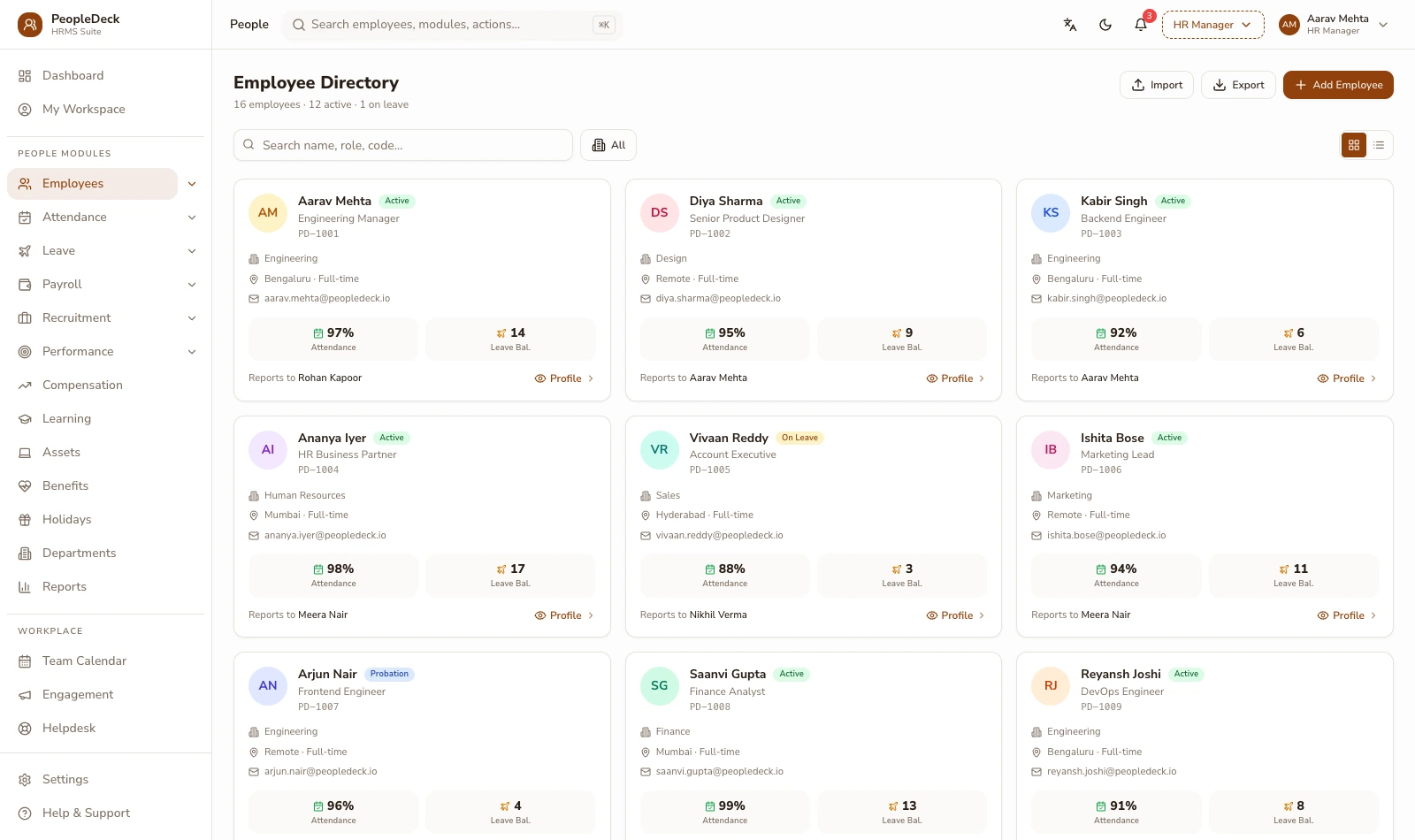
The employee database is the single record everything else reads: personal details, documents, statutory IDs, salary history and reporting lines held once, secured by role-based access, and tracked change-by-change in an audit trail. Payroll, attendance and self-service all read this master, which is why a correction made here is correct everywhere.
How it works
-
1
Build one profile per person, not one per tool
Each employee profile carries identity and contact details, the documents behind them, statutory IDs — UAN, ESIC number, PAN, Aadhaar-linked bank data where you choose to hold it, plus grade, location, cost centre and reporting manager. When payroll runs, when a punch lands, when a claim routes for approval, each module reads this same profile. There is no second copy to drift.
-
2
Capture records at the moments they exist
Most of the database fills itself: onboarding checklists collect documents and IDs before day one, self-service updates flow in through approval, payroll appends salary history run by run, and exits close the record with settlement details. Data entry as a standalone activity mostly disappears: the record accumulates as work happens.
-
3
Model the organisation, not just the people
Reporting lines, departments, locations and cost centres live on the profile, which is what makes approval routing, org charts and cost-centre payroll reporting possible downstream. Restructure the reporting line and approvals re-route themselves; move someone between cost centres with an effect date and the payroll reports follow.
-
4
Control access by role, prove usage by trail
Role-based access decides who can see and edit what — salary fields to payroll and leadership, documents to HR, contact basics to managers. The audit trail is the other half: who viewed or changed a sensitive record, when, from what, old value to new value. One is a lock, the other is a ledger; audits want both.
-
5
Retire records as carefully as you created them
Exited employees keep a closed record (settlement history, service dates, documents) retained under your policy for statutory and reference needs, access-restricted accordingly. The database stays clean without losing the history an audit or a re-hire check will one day need.
-
6
Report from the record, not around it
Because the master carries grades, locations, cost centres and dates, workforce reporting becomes a query instead of a project: headcount by department over time, attrition by location, tenure distributions, upcoming document expiries. The reports are only ever as good as the record, which is the practical argument for the workflows that keep the record clean.
What 'one master' looks like in practice
Illustrative: an operations executive gets promoted and relocates from Indore to Pune on the 10th. HR edits one profile: new grade, new location, new reporting manager, effect-dated. From that single edit: her approval requests now route to the new manager; Maharashtra professional tax applies from the effective date instead of Madhya Pradesh's; the new grade's salary structure drives her next payslip with arrears computed from the 10th; and the org chart redraws itself. Six systems' worth of updates, one record, one edit, full audit trail. The same edit also updates her cost-centre reporting from the effective date — finance sees the move in the same month it happened.
RBAC is not an audit trail; you need both
It is easy to conflate access control with accountability, and the difference matters in an inspection. Role-based access answers 'who could have?'; the audit trail answers 'who did?'. PeopleDeck treats them as separate guarantees: permissions are role-scoped and field-aware, while every read of a restricted field and every write to any field is logged immutably. Employee data stays India-hosted and access-controlled, handled in line with the DPDP Act's purpose-limitation and consent expectations, and never described with borrowed phrases like 'bank-grade', which promise nothing specific.
Key terms, plainly
UAN
Universal Account Number: the employee's portable PF identity across employers. Captured at onboarding, it keys the member's line in every monthly ECR.
RBAC
Role-based access control — permissions attached to roles rather than individuals, deciding field-by-field who can view or edit records.
Audit trail
The immutable log of who viewed or changed what, when, with old and new values: the evidence layer auditors and the DPDP Act's accountability expectations point to.
Cost centre
The accounting bucket an employee's cost belongs to, carried on the profile so payroll can report salary spend the way finance books it.
Effect-dated change
An edit that applies from a chosen date (promotions, transfers, revisions) letting downstream modules compute arrears and treatments correctly instead of from 'whenever someone typed it'.
What you get
- ✓ One profile per person: identity, documents, statutory IDs, salary history, reporting line
- ✓ Self-filling record: onboarding, ESS updates, payroll history and exits write to it
- ✓ Org structure, locations and cost centres for routing and reporting
- ✓ Field-aware role-based access plus a who-did-what audit trail
- ✓ Closed records retained under policy after exit
| Question | Answered by |
|---|---|
| Who can see salary fields? | Role-based access |
| Who changed this bank account? | Audit trail |
| Which fields can managers edit? | Role-based access |
| What did the record say before? | Audit trail |
Works with: Onboarding & offboarding · Employee self-service · Payroll engine
Consolidating scattered records into one master
Employee data usually lives in four places that disagree: a payroll sheet, an HR folder of scans, an org chart in slides, and the truth in someone's memory. Consolidation is a one-time import with validation doing the hard work: statutory ID formats checked, duplicates flagged, missing bank details listed as tasks rather than discovered on payday. The discipline that keeps the master clean afterwards is structural, not heroic: every later change arrives through onboarding, self-service approval or payroll, each writing to the same record under the same audit trail. You clean the data once; the workflows keep it clean.
Consolidation checklist
- 1.Export whatever exists — sheets, folders, the org chart
- 2.Import with validation; fix flagged IDs and duplicates
- 3.Attach documents to profiles with expiry dates where relevant
- 4.Define roles and field-level access before go-live
- 5.Set reporting lines and cost centres for routing and reporting
- 6.Turn on the audit trail review as a quarterly habit
Is this the right fit?
Built for you if
- ✓ Employee data disagrees between payroll, HR folders and the org chart
- ✓ An audit or investor diligence is coming and records live in inboxes
- ✓ Nobody can say who changed a bank account, or when
Not the fit if
- ✕ You want a full document-management suite for company files. This is the employee record, not a DMS
- ✕ You want CRM-style customer records. This database is people-on-payroll only
Related features
Running a school or college? Staff payroll belongs inside your ERP: SchoolDeck staff payroll or CampusAlly payroll.
Frequently asked questions
Who can see employee salary data?
Only the roles you grant, field by field, and every access of a sensitive field is itself logged, so visibility is both restricted and accountable.
Can we import existing records?
Yes — employee masters import from spreadsheets with statutory IDs validated on the way in, so payroll starts from a clean, checked base.
What happens to records when someone exits?
The record closes rather than disappears: settlement history, documents and service dates are retained under your retention policy with restricted access.
Do documents expire?
Documents can carry expiry dates (visas, certifications, contracts) and the record flags approaching expiries to the right role.
Is Aadhaar data required?
No; you decide which identifiers you collect and hold. The system's job is to secure and log whatever your policy requires.
How do transfers between locations work?
Effect-dated location changes propagate: professional-tax state, approval routing and reporting all follow from the record change, with arrears handled by payroll.
How is PeopleDeck priced?
Per employee per month, in rupees: the database is the foundation of the product, not a separately priced module.
Can we define custom fields?
Yes — add fields per your policy (blood group, uniform size, licence numbers) with the same role-based visibility and audit treatment as built-ins.
How long are exited records retained?
Under your configured retention policy: statutory records keep their required lifetimes, access narrows after exit, and deletion is a logged, deliberate act.