


Compliance, applied: every month
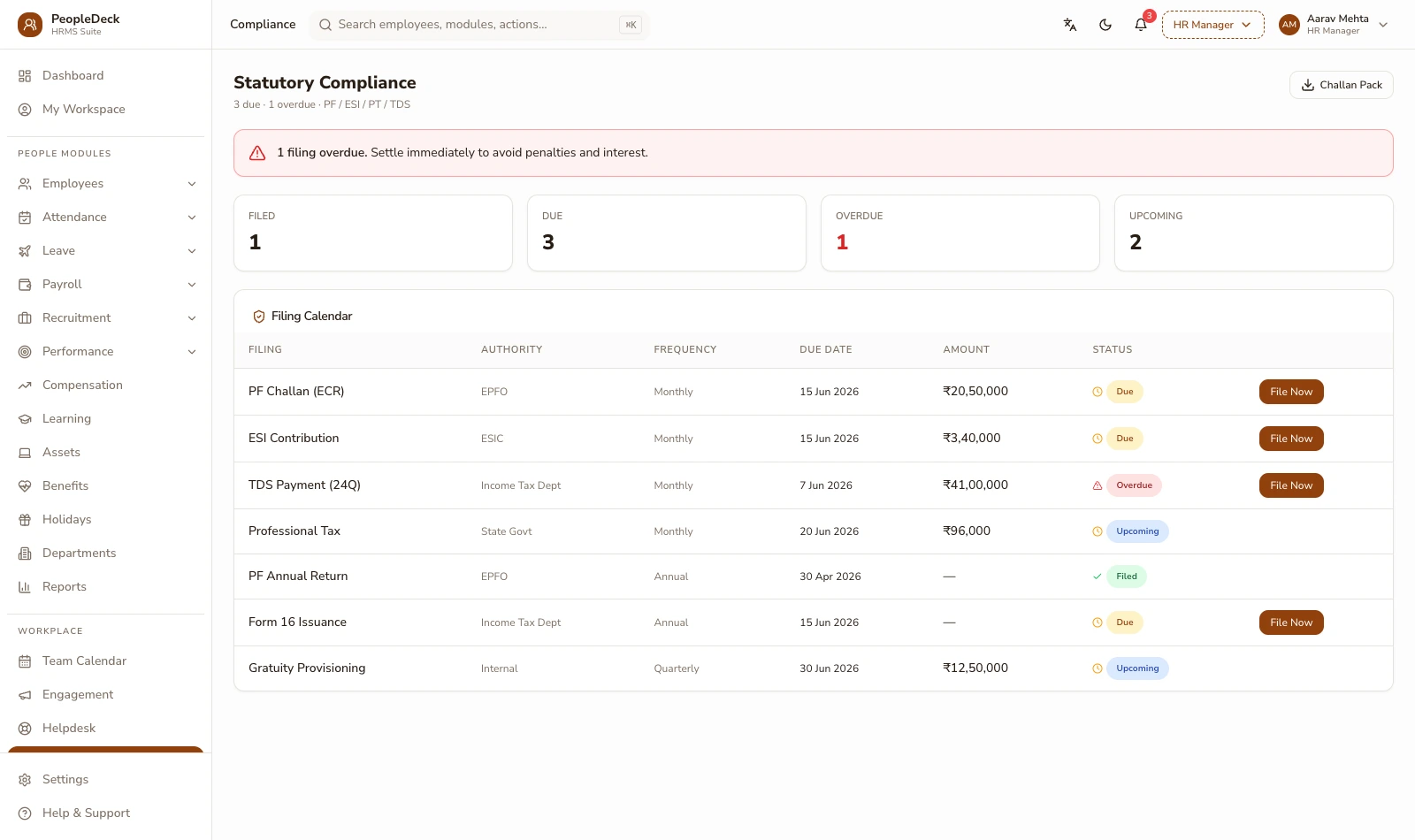
Statutory compliance in PeopleDeck means two guarantees: every payslip carries PF, ESI, professional tax and salary TDS applied at current rates, and every run generates the upload-ready files behind them — ECR for EPFO, the ESI contribution file, challan summaries, Form 24Q and Form 16. What it deliberately does not do is file on your behalf: this is the 'applied, not filed' page, and that boundary is the point.
How it works
-
1
PF, applied member by member
EPF applies at 12% employee plus 12% employer on Basic+DA up to the ₹15,000 wage ceiling: the ceiling formally notified on 29 May 2026 under the Code on Social Security 2020. The employer's 12% splits 3.67% to the PF account and 8.33% to the pension scheme, with the EPS contribution capped at ₹1,250; EDLI and admin charges add 0.50% each. Every member's monthly line (wages, contributions, NCP days) accumulates into the ECR the EPFO portal expects, due for upload by the 15th.
-
2
ESI, checked per contribution period
ESI applies at 0.75% employee and 3.25% employer on gross wages up to the ₹21,000 ceiling, with eligibility checked the way the scheme actually works: an employee crossing the ceiling mid-period continues contributing until the period ends. The two contribution periods (April–September, October–March) are tracked so the continue-until-period-end rule is applied, not approximated.
-
3
Professional tax, state by state
PT is a state subject and behaves like one: Karnataka and Telangana run monthly slabs, Tamil Nadu runs half-yearly, Kerala levies through local bodies, and states like Delhi, Rajasthan, Uttar Pradesh and Haryana levy none. Each employee's work state drives the treatment, which is exactly what breaks in spreadsheets the day you hire in a second state.
-
4
Salary TDS, computed monthly, accumulated annually
TDS on salary follows each employee's declared regime and investments: computed monthly with the projection method, adjusted as declarations change, and accumulated into the quarterly Form 24Q data and each employee's annual Form 16. The workings behind every month's deduction are visible — to payroll, and to the employee on their payslip.
-
5
Files generated, sign-off yours
Each approved run leaves you with the file set: member-wise ECR ready for the EPFO portal, ESI contribution file, challan-ready payment summaries, Form 24Q data and Form 16 generation at year-end. Upload and filing remain with you or your consultant, with files that are complete and current-rate rather than half-built exports.
One employee, three statutes, one payslip
Illustrative: a Bengaluru analyst earns ₹19,500 gross with Basic+DA of ₹12,000. PF: 12% of ₹12,000 = ₹1,440 employee-side, matched by the employer and split ₹440 PF / ₹1,000 EPS (under the ₹1,250 cap). ESI: gross under ₹21,000, so 0.75% = ₹146 employee and 3.25% = ₹634 employer, tracked in the April–September period. Karnataka PT: ₹200 for the slab. TDS: nil this month under her declared regime after projection. Her payslip shows each line with its basis; the month's ECR and ESI files carry her exact figures. Arithmetic, shown, not a case study claimed.
'Applied, not filed': the whole point of this page
The engine applies statutory rates and generates upload-ready files; it does not log into EPFO, ESIC or TRACES and act for you. Filing carries legal identity (establishment credentials, authorised signatories, DSCs) and those stay with your establishment or your consultant, where accountability actually lives. The product's promise is narrower and more useful: that what you upload is complete, member-accurate and computed at the rates in force. Thresholds move; the engine's rates are maintained against the anchors above (verified 29 June 2026 — re-verify at build), and your consultant's judgement stays in the loop where the law puts it.
Key terms, plainly
ECR
Electronic Challan-cum-Return — EPFO's monthly member-wise contribution file. Generated from the approved run, uploaded by the employer by the 15th.
Contribution period
ESI's six-month windows (Apr–Sep, Oct–Mar). An employee crossing the wage ceiling mid-period keeps contributing until the period ends: the rule the engine tracks explicitly.
Form 24Q
The quarterly TDS-on-salary return data: employee-wise salary and deduction detail that accumulates from the monthly runs.
Form 16
The annual TDS certificate issued to each employee, generated from the year's accumulated payroll data and delivered via self-service.
NCP days
Non-contributory period days in the ECR — unpaid days reducing PF wages for the month, computed from attendance's LOP record.
What you get
- ✓ EPF at current ceiling and splits, member-wise into the ECR
- ✓ ESI with period-end continuation handled correctly
- ✓ State-wise professional tax, from Karnataka slabs to no-PT states
- ✓ Monthly TDS by declared regime, accumulating to 24Q and Form 16
- ✓ Every file upload-ready from the approved run — filing stays yours
| File | For | Generated |
|---|---|---|
| ECR | EPFO portal | Member-wise, from the approved run |
| ESI contribution file | ESIC portal | Period-aware, from the approved run |
| Challan summaries | Payment reference | Per statute, per month |
| Form 24Q data | Quarterly TDS return | Accumulated from monthly runs |
| Form 16 | Each employee, annually | Generated and delivered via ESS |
Works with: Payroll engine · Bangalore payroll · Mumbai payroll · Chennai payroll
Getting compliant mid-year without losing history
Switching compliance tooling mid-year raises the right worry: the year's history must survive. The migration carries year-to-date figures — PF wages and contributions, ESI period status, TDS deducted against each employee's projection, so the files you generate from month one reconcile with what was already deposited, and year-end Form 16 tells one continuous story. It is also the honest moment to reconcile past practice: parallel-running one month against your consultant's workings surfaces any drift between what was deposited and what should have been, while there is still a clean month to fix it in.
Compliance cutover checklist
- 1.Carry in year-to-date PF, ESI and TDS figures per employee
- 2.Verify establishment codes and contribution rates with your consultant
- 3.Map each employee's work state for professional tax
- 4.Parallel-run one month against existing workings
- 5.File from the generated ECR and challan set with your sign-off
- 6.Diarise threshold re-verification with each budget and notification cycle
Is this the right fit?
Built for you if
- ✓ Your PF and ESI files are hand-built and the 15th is always tense
- ✓ You hire across states and professional tax became a research project
- ✓ Your consultant wants workings, not screenshots
Not the fit if
- ✕ You want the software to log into portals and file — accountability stays with your establishment, so it will not
- ✕ You want tax advice: the engine applies rates; advice remains your consultant's craft
Related features
Running a school or college? Staff payroll belongs inside your ERP: SchoolDeck staff payroll or CampusAlly payroll.
Frequently asked questions
Which files does each run produce?
Member-wise ECR, the ESI contribution file, challan-ready summaries and the TDS workings that accumulate into Form 24Q and Form 16, all upload-ready, none hand-assembled.
How is professional tax handled across states?
Each employee's work state drives the slab — monthly in Karnataka or Telangana, half-yearly in Tamil Nadu, local-body in Kerala, none in Delhi, Rajasthan, UP or Haryana. See the city pages for Bangalore, Mumbai and Chennai for local specifics.
What happens when an employee crosses the ESI ceiling?
They continue contributing until the contribution period ends, as the scheme requires: the engine tracks the period, not just the month.
Does the engine file returns automatically?
No; it generates upload-ready files and you or your consultant file them. Nothing reaches a portal without your sign-off; that is the design, not a limitation.
How current are the statutory rates?
Maintained against verified anchors — EPF's ₹15,000 ceiling notified 29 May 2026 under the Code on Social Security 2020, ESI's ₹21,000 ceiling, and surfaced transparently so your consultant can verify at a glance.
Where do NCP days come from?
Straight from attendance's loss-of-pay record: the same reconciled data payroll pays on, so the ECR never disagrees with the payslip.
How is PeopleDeck priced?
Per employee per month, in rupees — compliance outputs included, not a 'compliance module' upsell.
What happens when thresholds change?
Rates are maintained against notifications and surfaced transparently, and because files are generated, not hand-built, a threshold change is absorbed by the next run, not by re-teaching a spreadsheet.
Can we handle employees under both old and new tax regimes?
Yes — regime is per employee from their declaration, and each projection, deduction and Form 16 follows the declared regime individually.