


Answers without asking HR: employee self-service
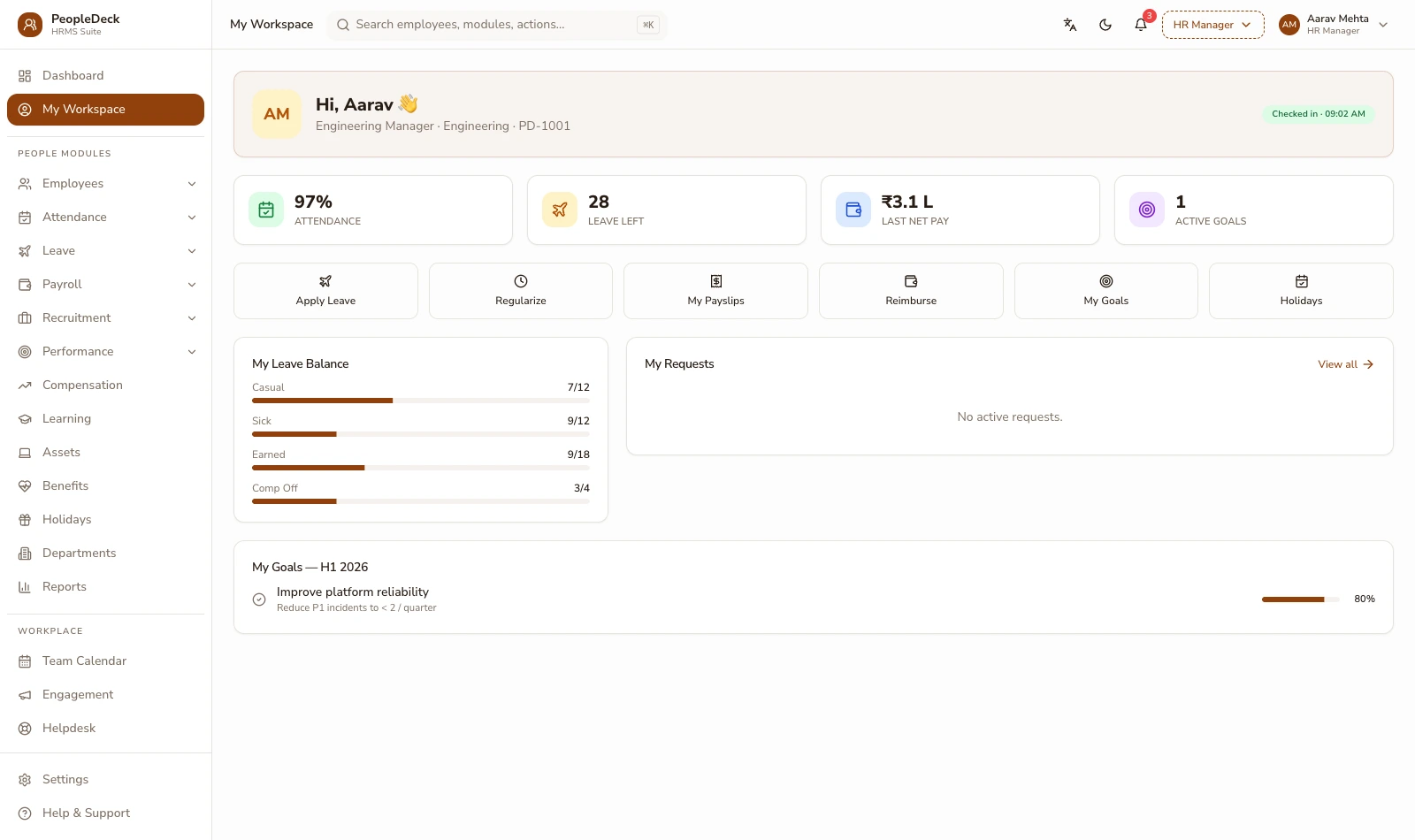
The self-service portal is where employees answer their own questions: payslips and Form 16 to download, live leave balances to apply against, expense claims to submit with receipts, and personal details kept current through approval. Managers approve in the same place. Every capability is powered by the module that owns it: the portal delivers, it never duplicates. It works on web and mobile alike, so desk-less teams get the same access as head office.
How it works
-
1
Payslips and tax documents, self-served
Every payslip the payroll engine issues is permanently available to that employee (current month and full history) along with Form 16 once payroll generates it each year. The single biggest category of HR interruptions ('can you resend my payslip?') simply stops existing, because the answer lives in the employee's own login.
-
2
Leave that checks itself before it asks
An employee applying for leave sees the live balance, the team calendar and the policy rule before submitting. The application reaches the manager with context — balance, overlapping team leave, shift coverage where rostered, so approval is one informed tap rather than a reply-all investigation.
-
3
Claims with the receipt attached
Expense claims are submitted from the portal or app with the receipt photographed at the moment it exists. Category and policy limits validate at submission, the approval routes by your rules, and the employee can see exactly where their claim stands instead of asking accounts.
-
4
Personal records, current by default
Address changes, bank account updates, emergency contacts, new qualifications — employees submit updates that route through approval into the employee database. The master record stays current without HR re-typing anything, and every change lands in the audit trail.
-
5
Approvals that follow the manager
Leave, regularisation and claims arrive in one approval queue on web and mobile. Managers see the request with its context, decide, and the decision propagates (to balances, to attendance, to the next payroll run) without anyone forwarding an email.
-
6
Keep the record honest in both directions
Self-service also protects the company: because every employee sees their own attendance, balances and payslip workings, discrepancies surface in days instead of at exit. An employee who disputes a leave balance does it in October with the record open, not during a full-and-final negotiation in March, and the audit trail behind each figure means the conversation is about facts, not recollections.
A day in the portal, concretely
Illustrative: on the 1st, payslips publish, no emails, employees just see them. On the 3rd, a developer applies for two days' leave; the portal shows four days' balance and a teammate already off Thursday; the manager approves from the app in the lift. On the 7th, a sales executive photographs a fuel receipt, files it under local conveyance within the ₹2,000 monthly cap, and watches it move to approved. On the 12th, a new joiner updates her bank account; HR approves; payroll pays the new account that same month. None of these touched HR's inbox. By month three, the pattern is stable: HR's inbox holds exceptions, not requests, and every request that does arrive already carries its own context.
Delivery, not duplication
Self-service deliberately re-owns nothing. Payslips remain the payroll engine's output; balances remain attendance & leave's ledger; claims belong to expense management; the person record belongs to the employee database. The portal is the window onto those systems, which is why what an employee sees always matches what HR and payroll see, and why Form 16 is delivered here after payroll generates it, never 'filed' from here. Role-based access decides what each person can see; the audit trail records what each person did.
The practical consequence is trust: when employees can verify their own payslip workings and balances at any hour, payroll stops being a black box and HR stops being its help desk. Transparency here is not a feature bullet; it is what makes the rest of the system's numbers accepted without argument.
Key terms, plainly
ESS
Employee self-service: the authenticated portal and app surface where employees consume HR outputs (payslips, balances, claims) and submit requests that route through approval.
Form 16
The annual TDS certificate an employer issues to each employee, generated by payroll from the year's accumulated salary TDS and delivered through self-service.
Approval routing
The rule that decides who approves a request (by reporting line, department or amount) so requests reach the right person without being forwarded.
Investment declaration
The employee's statement of tax-saving investments and chosen regime, submitted via ESS, which drives monthly TDS computation in payroll.
What you get
- ✓ Payslip and Form 16 download, current and historic, per employee
- ✓ Leave applications against live balances with team-calendar context
- ✓ Receipt-backed expense claims with policy checks at submission
- ✓ Personal-detail updates routed through approval into the master record
- ✓ One approval queue for managers, on web and mobile
| You see in ESS | Owned and computed by |
|---|---|
| Payslips, Form 16 | Payroll engine |
| Leave balances, holidays | Attendance & leave |
| Expense claims | Expense management |
| Personal record | Employee database |
Works with: Payroll engine · Expense claims · Employee database
What changes for HR when ESS goes live
The first fortnight of self-service is measurable in interruptions: payslip requests stop first, then balance questions, then claim-status chasing. What replaces them is quieter and better — employees correcting their own stale records through approval, declarations arriving digitally before the TDS cycle needs them, and managers approving from context instead of forwarding emails. The practical rollout advice is to publish payslips through ESS from the very first month and to announce exactly one channel for HR requests: the portal. Adoption follows payslips; everything else follows adoption.
Go-live checklist
- 1.Enable logins for all employees — mobile-first for non-desk staff
- 2.Publish current-month payslips through the portal first
- 3.Open leave applications with live balances visible
- 4.Switch investment declarations to digital collection
- 5.Turn on claim submission with policy limits configured
- 6.Announce the portal as the single channel for HR requests
Is this the right fit?
Built for you if
- ✓ HR spends real hours resending payslips and answering balance questions
- ✓ Investment declarations arrive on paper, late, and TDS projections suffer
- ✓ Field and plant staff have no desk, and therefore no access to their own records
Not the fit if
- ✕ You want a public careers portal; that is the recruitment module's surface
- ✕ You expect employees to edit records without approval — changes route through control by design
Related features
Running a school or college? Staff payroll belongs inside your ERP: SchoolDeck staff payroll or CampusAlly payroll.
Frequently asked questions
Can employees see old payslips?
Yes, every payslip ever generated for them stays available, along with each year's Form 16, so document requests to HR effectively end.
Do managers approve inside the portal?
Yes — leave, regularisation and claims land in one queue on web and mobile, with the context needed to decide on the spot.
Can employees change their bank account themselves?
They can submit the change; it routes through approval before payroll uses it — self-service for the employee, control for the company.
Does ESS work for factory workers without email?
Yes — mobile-first login works for staff without a company mailbox, and payslips are as accessible on a phone as at a desk.
What can HR restrict?
Everything is role-based, which fields employees can edit, which documents they see, which requests route where. Access rules sit with the employee database's RBAC.
Is the investment declaration collected here?
Yes — employees declare regime and investments through ESS, and payroll's monthly TDS computation follows the declaration.
How is PeopleDeck priced?
Per employee per month, in rupees — ESS is part of the product for every employee, not an add-on module.
Can we control which fields employees see?
Yes — visibility is field-level and role-based: salary components, documents and history each follow the access rules the employee database defines.
Does ESS work in regional languages?
The portal's employee surfaces are built for straightforward, low-literacy-friendly use; language coverage is expanding; ask us for the current list before rollout.