


HR in every: pocket
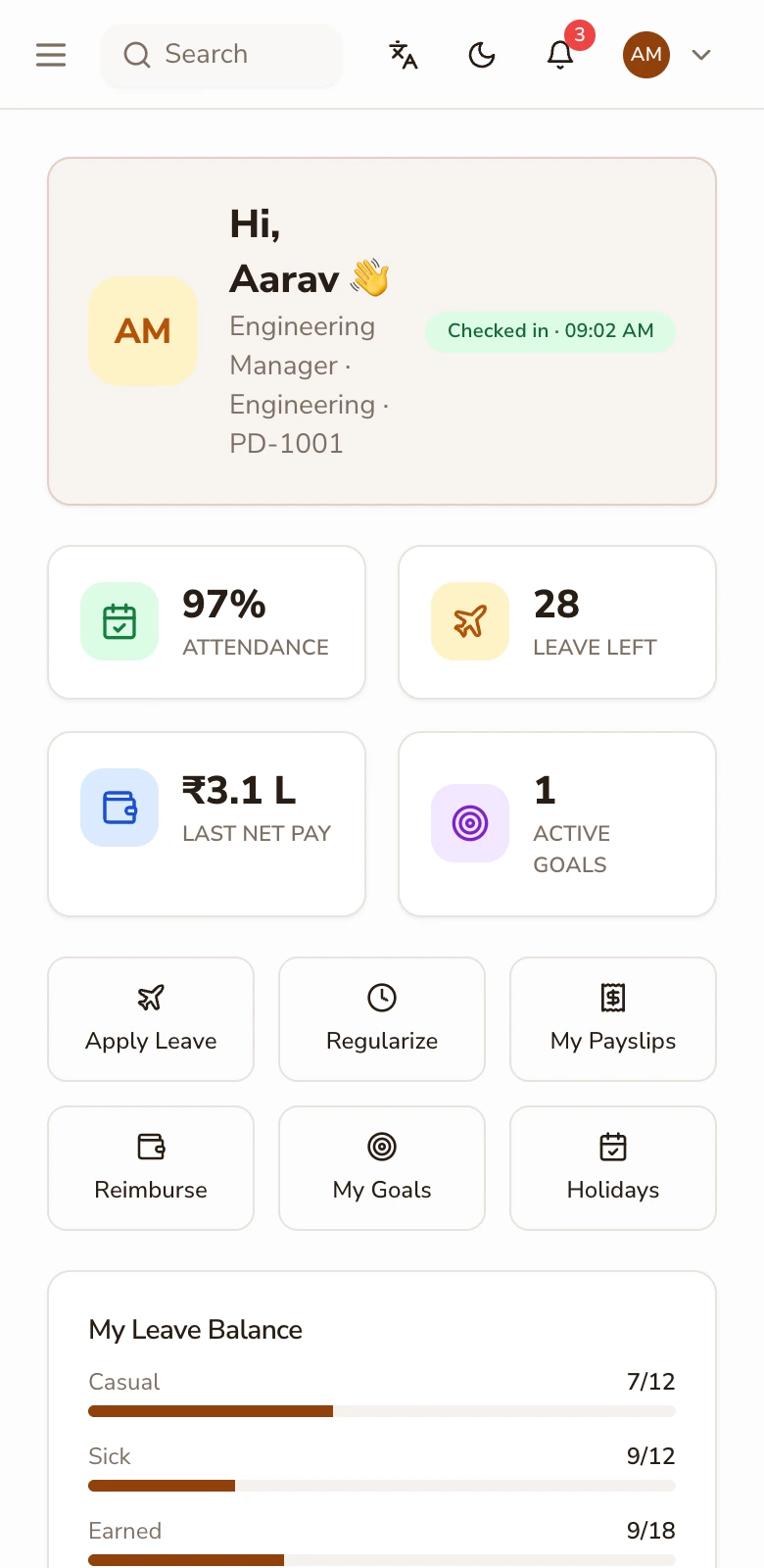
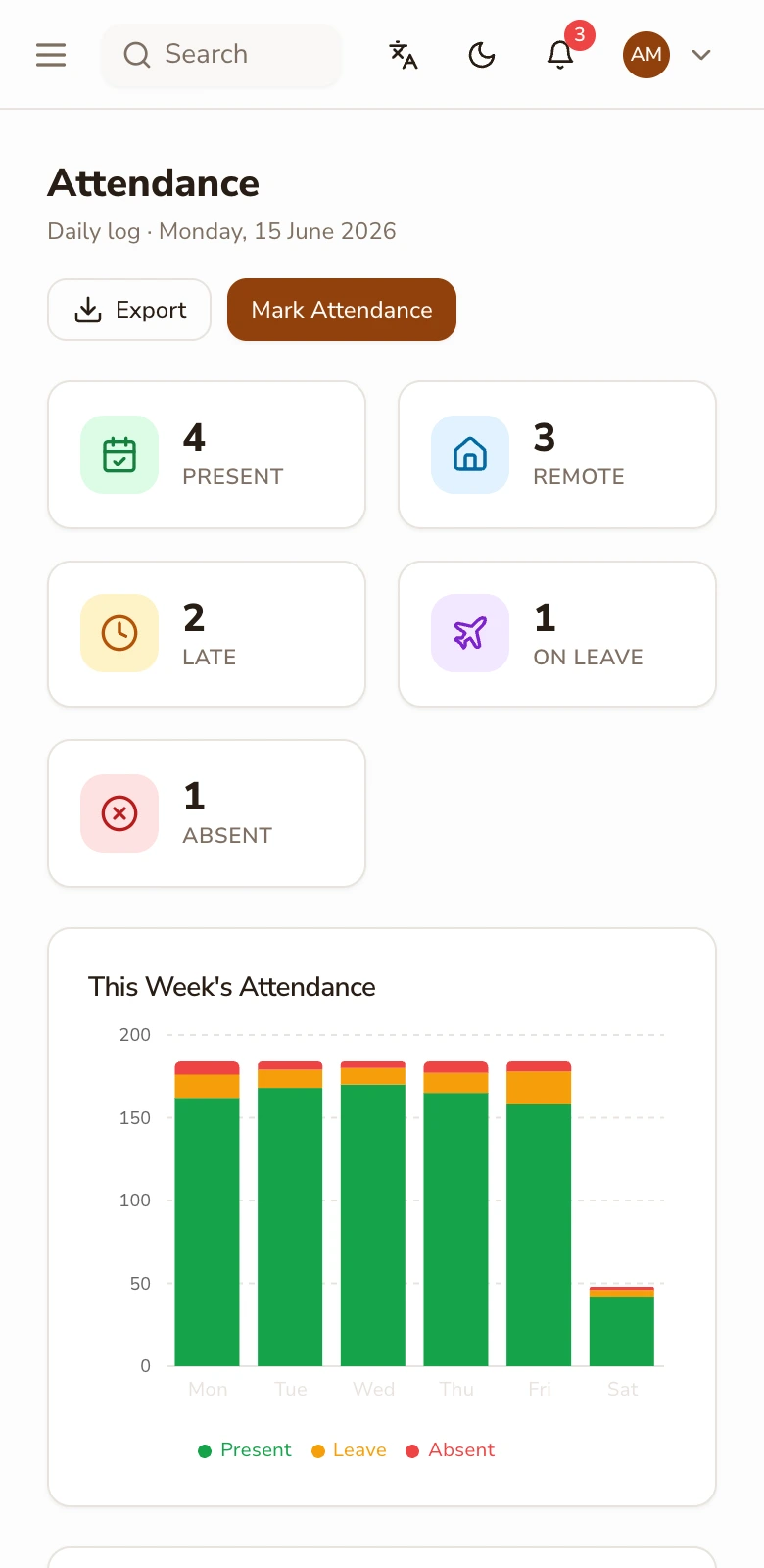
One app for the whole company, role-based from login: employees view payslips, apply for leave against live balances, punch attendance by QR or geofence and submit claims with the receipt photographed on the spot; managers carry their approval queue with them. iOS and Android, included for every employee: the app is a delivery surface for the modules that own each capability. It installs on employees' own phones with role-based access, no device fleet, no separate manager app.
How it works
-
1
Give every employee the answers in their hand
Payslips and Form 16, leave balances, holiday calendars, claim status: the questions that otherwise walk up to HR's desk resolve in the app. For plant and field workforces where employees may never sit at a company desk or hold a company mailbox, mobile-first login is the difference between self-service existing and not.
-
2
Punch attendance where the work is
On-mobile attendance is a QR scan at the gate or a geofence punch inside the site radius — presence-bound, hardware-free, and landing in the same attendance record as every web or RFID punch. Offline-tolerant punching syncs when signal returns, which matters at basements, sites and warehouses more than at desks.
-
3
File the claim while the receipt exists
The camera is the expense workflow: photograph the receipt, pick the category, submit — policy limits check instantly and the claim routes. Field teams file complete claims the day costs happen instead of reconstructing a month from a wallet of fading paper.
-
4
Let managers decide from wherever they are
Leave, regularisation and claim approvals arrive as one queue with full context — balances, coverage, receipts, history. Most approvals are a ten-second decision made in a corridor; the app makes the corridor version as informed as the desk version.
-
5
Keep roles and security sensible
Login is role-based, so an employee, a manager and an HR admin see three different apps in one. App unlock can use the device's own fingerprint or face; that is device security, standard on every phone, and entirely different from face-recognition attendance, which this product does not do.
-
6
Let the app carry the calendar too
Payday, holiday lists, approval nudges and document-expiry reminders reach people where they actually look; their phone. Notifications are configurable per event type, so the app informs without nagging: an employee hears about their payslip and their pending approval, not about everything the system did today. For distributed teams, this is the difference between a policy existing and a policy being known.
A field day, run from the app
Illustrative: a service technician starts at a customer site inside the geofence — punch registered at 9:04. Mid-morning he photographs a ₹320 spares receipt into a claim; policy validates and it routes. At lunch he checks his leave balance and applies for Friday; his manager, at another site, approves from the queue with coverage visible. Payday lands mid-month and his payslip is in his pocket before the bank SMS arrives. Four interactions with the company's HR systems, zero desks involved. And when the holiday list changes, the whole crew knows by lunch because the calendar lives where they look.
Device biometrics are not attendance surveillance
The line is worth stating plainly: the app can use your phone's own fingerprint or face unlock to open (a device capability that never leaves the device) and on-mobile attendance is a QR or geofence punch. PeopleDeck does not do face-recognition attendance, location trails beyond the punch, or any always-on monitoring. Claims are qualitative by policy too: no '99.9% uptime' or 'zero errors' theatre: the app's job is simply that the same records the desk sees are in every pocket, with role-based access following every login.
None of this requires managing devices: the app runs on employees' own phones with role-based access doing the guarding, so IT is not adopting a fleet, just a login. That is usually the difference between a rollout that happens and one that stalls at procurement.
Key terms, plainly
Geofence punch
An attendance punch that registers only inside a defined radius around a work site — presence-bound attendance with no gate hardware.
Role-based app
One app that renders per role at login (employee, manager, HR admin) instead of separate apps to install and support.
Offline-tolerant punch
A punch captured without signal and synced when connectivity returns, for basements, plants and remote sites.
Approval queue
The manager's single list of pending decisions (leave, regularisation, claims) each carrying the context to decide immediately.
What you get
- ✓ Payslips, Form 16, balances and claim status for every employee
- ✓ QR and geofence attendance punches, offline-tolerant
- ✓ Camera-first expense claims with instant policy checks
- ✓ Manager approval queue with full context, on the go
- ✓ Role-based rendering; device-level app unlock; iOS and Android
| In the app | Owned by |
|---|---|
| Payslips & Form 16 | Payroll engine |
| Balances & punches | Attendance & leave |
| Claims & receipts | Expense management |
| Profile details | Employee database |
Works with: Attendance & leave · Employee self-service · Expense claims
Driving adoption beyond the office
An HR app succeeds or fails at the plant gate, not at head office. The adoption play is concrete: publish payslips through the app first (the one document everyone wants), print the QR punch codes the same week, and enrol supervisors before workers so approvals never bottleneck. For workforces without company email, mobile-first login removes the last excuse; for everyone else, the first payday notification does the marketing. Within a cycle, the app stops being an initiative and becomes where HR simply happens, which is the only adoption metric that matters. Print the QR codes before the announcement, not after — gates teach the app faster than emails do. Adoption is the real metric, and payslips are the hook; once staff open the app monthly for pay, leave and claims follow without a rollout campaign.
Adoption checklist
- 1.Enable mobile-first logins for staff without company email
- 2.Publish payslips through the app from month one
- 3.Print and mount QR punch codes at gates and sites
- 4.Enrol managers first so the approval queue is live
- 5.Configure geofences for field locations
- 6.Announce one channel: the app is where HR happens
Is this the right fit?
Built for you if
- ✓ Half your workforce never sits at a desk but still needs payslips and leave
- ✓ Managers travel and approvals queue behind them
- ✓ You want mobile attendance without buying gate hardware
Not the fit if
- ✕ You want offline-first full HR administration from a phone — admin depth lives on the web app
- ✕ You want employee location tracking through the day: the app reads location only at a geofence punch
Related features
Running a school or college? Staff payroll belongs inside your ERP: SchoolDeck staff payroll or CampusAlly payroll.
Frequently asked questions
Is the app included in the price?
Yes — iOS and Android apps ship with PeopleDeck for every employee and manager. Pricing stays per employee per month; there is no per-app fee.
Does the app do face-recognition attendance?
No: attendance on mobile is a QR or geofence punch. The only biometric involved is your device's own unlock, which stays on the device.
Can workers without company email use it?
Yes — mobile-first login works without a company mailbox, which is exactly what plant and field workforces need.
What happens with no signal at the site?
Punches capture offline and sync when connectivity returns, so a basement or remote site does not cost anyone their attendance.
Do managers get a different app?
Same app, different role — managers see their approval queue and team views in addition to their own employee surface.
Does the app track location all day?
No — location is read only at the moment of a geofence punch, for the punch. No trails, no background tracking.
How is PeopleDeck priced?
Per employee per month, in rupees: the app is part of the product for everyone on it.
Which platforms are supported?
iOS and Android, kept in step: the app renders by role at login, so one install serves employees, managers and HR.
Can notifications be controlled?
Yes — payday, approvals and reminders are configurable per event type, so the app informs without nagging.