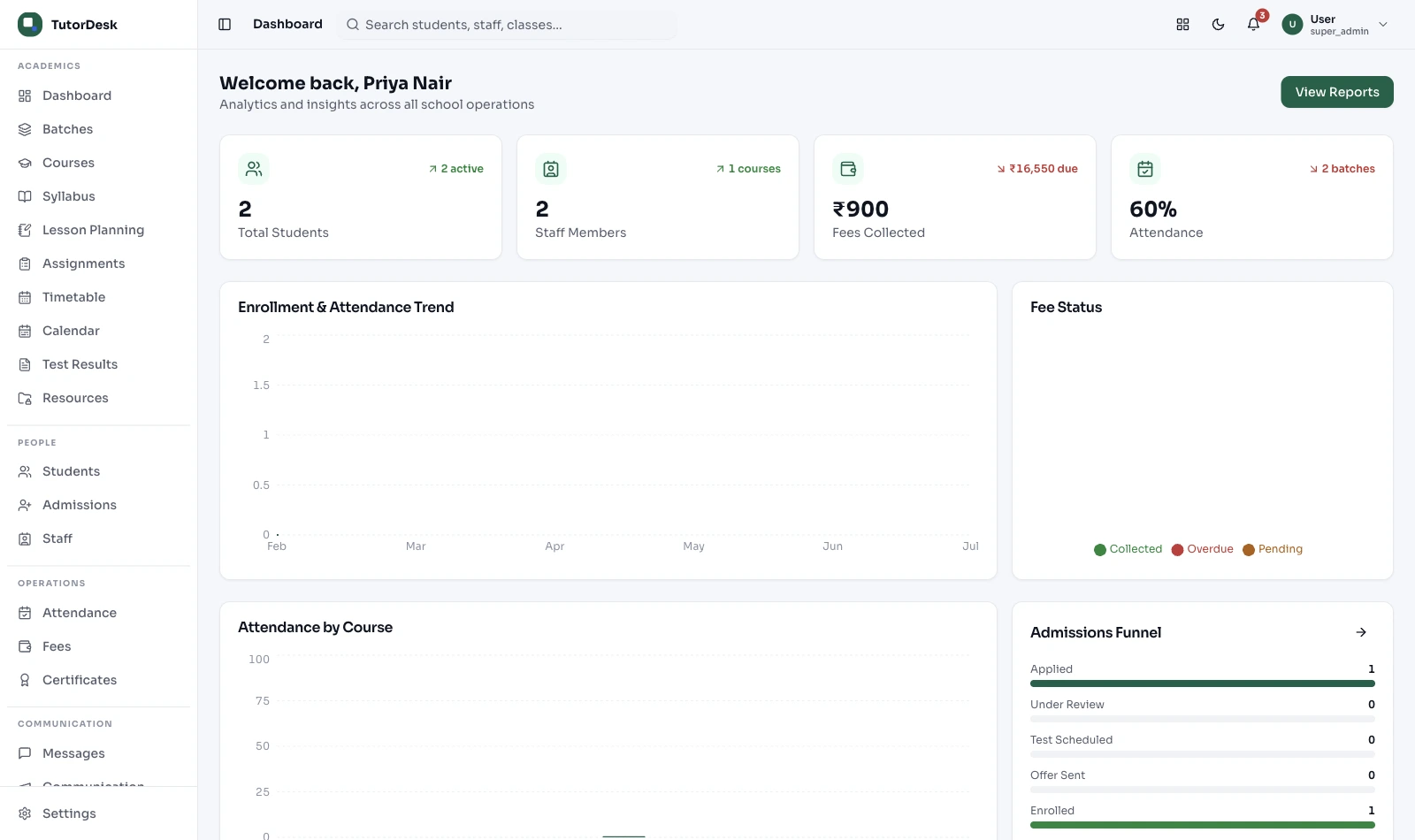
A diary for enquiries, a whiteboard for batches, Excel for fees, a register for attendance, three WhatsApp groups for parents. It works — until it doesn't. TutorDesk puts the whole institute on one connected platform, so a student you admit once exists everywhere.
What is coaching institute management software?
It's one connected platform that runs the whole institute — admissions, batches, fees, attendance, tests and parent communication — instead of separate apps, registers, spreadsheets and WhatsApp groups. Because everything sits in one system, a student you admit once exists everywhere — for fees, attendance and tests — so nothing is re-typed. It's sometimes called a coaching ERP; we just describe it in plain terms.
One system, not seven
Here's what an all-in-one platform replaces — and where to go deep on each job. (No need to read it all today; start with the one that hurts most.)
| What you're juggling now | In one connected platform | Go deeper |
|---|---|---|
| Enquiries in a diary & WhatsApp | Admissions journey | Admissions → |
| Batches on a whiteboard | Multi-batch timetable | Batch Timetable → |
| Fees in a cash book | Fee collection & reminders | Fees & Finance → |
| Attendance register + parent calls | Attendance & progress updates | Attendance & Progress → |
| Test marks in Excel | Test series & results | Tests & Exams → |
| Faculty pay on paper | Teacher & staff management | Teacher & HR → |
| Scattered parent messages | One parent communication channel | Parent Comms → |
Multi-branch oversight
This is why larger institutes move to one platform: the owner sees admissions, fees and attendance across every branch in a single view, while each branch head sees only their own through role-based access.
No fabricated branch limits, no chasing each centre for a weekly Excel — just one consistent way of working, whether you run two branches or twenty.
How institutes adopt it
You don't move everything at once. Most institutes start small and grow into the platform.
Usually fees or admissions — move just that
Students now exist for everything else to reuse
Scheduling, attendance, tests or comms next
Each branch its own space, owner sees all
Admissions, fees, attendance side by side
Who it's built for
This platform suits larger and competitive-exam institutes. Running something smaller or fully hybrid? We have a closer fit.
Multi-subject, multi-track, with test series and shared faculty. One platform keeps admissions, batches, tests and pay connected instead of scattered across tools.
Competitive examSeveral centres under one brand. The owner gets a single cross-branch view; each branch head runs their own — one consistent system everywhere.
Multi-branchRunning one centre or a handful of batches? You may want a lighter starting point — see tuition centre management, built for that scale.
Lighter fit →Mixing in-person and online students in the same batch has its own quirks — see hybrid coaching management for that setup.
Hybrid fit →Why one platform wins
The value isn't a longer feature list — it's that everything talks to everything else.
Admit a student once and they exist for fees, attendance and tests — no re-typing.
See admissions, fees and attendance across branches in one place.
Switch on the parts you need now; add the rest later.
Access-controlled, India-hosted with backups, under the DPDP Act 2023 — never sold.
Parent messages go out as TRAI DLT-registered templates, not spam.
Students, parents and teachers get a clean app experience under your institute's identity.
Frequently asked questions
Overview, adoption, branches and how this fits the detailed pages.
Is TutorDesk an ERP?
People often search for a "coaching ERP", and TutorDesk does the same job — it connects admissions, fees, scheduling, attendance, tests and communication in one place. We just describe it in plain terms rather than jargon, and you switch on the parts you actually need.
Do I have to buy every module at once?
No. Most institutes start with one painful job — usually fees or admissions — and add the rest once the team is comfortable. Because it's one platform, each part you turn on connects to what's already there, so adoption is gradual, not a big-bang switchover.
Can it manage multiple branches from one place?
Yes — this is the main reason larger institutes adopt one platform. The owner gets a single view across branches for admissions, fees and attendance, while each branch head sees only their own through role-based access. There's no fabricated branch limit; it's about one consistent way of working everywhere.
Does it run JEE and NEET test series with ranks?
Yes, through the test and exam part of the platform. It supports online (CBT) and offline (OMR) tests and produces each student's standing within that test series — a relative rank or percentile among those who sat it. It does not claim to predict a student's actual national exam rank. The workflow lives in Test & Exam management.
How does faculty pay work?
The platform records the classes each teacher conducts, and per-class or per-hour pay is calculated from that in Teacher Management. Scheduling and payroll stay cleanly separate — the timetable plans classes and the pay calculation reads them.
Is our student and parent data secure?
Data is access-controlled — staff see only what their role allows — hosted in India with regular backups, and handled under the Data Protection Act (DPDP Act 2023). Parent and student contact details are used for institute communication on a consent basis, not sold to anyone.
How is this different from the individual solution pages?
This page is the overview — why running everything on one connected platform beats juggling separate tools. Each job has its own detailed page: admissions, batch timetable, fees, attendance, tests and parent communication. Use this for the whole picture, then open the specific page for depth.
What if I only run a small tuition centre?
Then a lighter starting point may suit you better — see tuition centre management. If you mix in-person and online students in the same batch, hybrid coaching management is the closer fit.
Get started
A 30-minute demo — tell us your biggest headache and we'll show you that part first.


